
TerminalTags
Stick a named, colored tag on any window.
8 followers
Stick a named, colored tag on any window.
8 followers
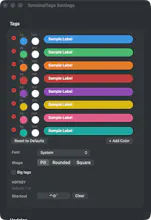
Terminal Tags labels your windows with colored floating tags so you always know which terminal, or app, is which at a glance. A global hotkey tags the focused window instantly, no menu-bar click needed, and clicking a tag brings that window straight to the front, even if minimized. Built for people juggling ten terminals at once, but it works on any window: editors, browsers, design tools, whatever you need to keep straight. Lives quietly in your Mac menu bar and Windows and Linux tray.




honestly this looks super useful for my setup, but one thing i'd love is the ability to save tag presets per app, so like my terminal always gets a red one and my editor gets blue without me hitting the hotkey every time. would save a lot of friction
@hiradhbl That's a really solid idea, per app defaults would cut out a bunch of repetitive tagging. Not in there yet but it's the kind of thing that makes sense to add. Appreciate the suggestion, taking note of it!
Finally something that solves my chaotic terminal situation. The global hotkey tagging is slick, and I love that clicking a minimized window just yanks it forward. Tried it on my editor too and it stuck.
@asl5756949768 Nice, glad the click to restore is landing well too. And good to hear it holds up outside terminals, that was the goal from the start.
The global hotkey for tagging is such a smart call, no menu hunting while you're mid-flow. Love that clicking a tag pulls a minimized window back to focus too, that's the kind of detail most window managers skip.
@elanurybrp Thanks, that was the idea, keep tagging out of the way so it doesn't break your flow. And glad the click to restore stood out, felt like an obvious feature once we had tags at all but a lot of tools skip it.
Finally something that fixes my daily chaos of five terminals and a VS Code all named "bash." The global hotkey for tagging the focused window is the killer feature, way faster than digging through a menu bar icon.
@duranznk3 Really glad the hotkey clicked for you! That was actually the whole reason I built this, I was tired of the "which bash is this" game myself. Appreciate you calling it out.
the global hotkey to tag the focused window without breaking flow is a really thoughtful touch, especially for anyone living in the terminal.
@nurtenztelwxgi Thanks, that flow piece mattered a lot to me, didn't want tagging to mean stopping what you're doing. Glad it's landing that way.
finally something that fixes my ten-terminal chaos honestly the global hotkey to tag the focused window is so much faster than digging through menu bar stuff
@bayramaknckosp Ha, ten terminals, that's exactly the chaos this was built for. Glad the hotkey's saving you the menu digging!