
Termalin
Safe SSH for you and your AI agents
5 followers
Safe SSH for you and your AI agents
5 followers
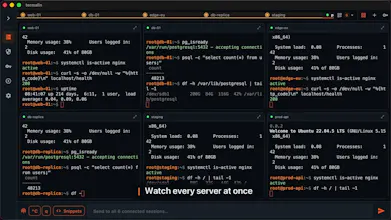
A fast cross-platform SSH client (tabs, SFTP with a built-in editor, a database client, session recording) with a built-in MCP server: Claude Code, ChatGPT or any agent works on your servers and never holds your keys, and you decide what it may run. New in 0.1.48: RDP and VNC remote desktops, the Connector on Windows and macOS, encrypted server backups and Termalin for Chrome. Plus monitoring and alerts with nothing to install. Free tier, no host limits.


Free Options
Launch Team / Built With


Dropbox SignSimple, secure eSignatures for the way your team works.
Promoted
Launch-day update 🚀 — since I first posted this, Termalin grew a built-in database client too. Same custody idea, applied to data: browse and query 13 engines (Postgres, MySQL, Mongo, Redis, ClickHouse, Neo4j…) with a real SQL editor — and when you point an agent at it, DB access is read-only by default and off until you flip it, per connection. The app holds the credential; the agent never gets the connection string. So Claude can answer “why did signups drop Tuesday” by reading the rows, and can't drop a table if it tried. Would genuinely love feedback on the security model — AMA.
Termalin 0.1.45 is out: background jobs and one command on several servers for Claude and ChatGPT; a note for AI on each Connector (what the server is and what to be careful with), which AI apps read before working there; local AI agents can pause while the app is locked (optional); MobaXterm import in the web cabinet, folders included; and a changed server key is no longer a dead end, the web terminal says so and lets you trust the new key. Full notes: termal.in/changelog
Termalin 0.1.47 is out, and with 0.1.46 the app now has an AI assistant: it summarizes a recorded session (what it did, what failed, what's left), explains selected terminal output, and turns a request into a command typed at the cursor (Ctrl+Shift+K) that it never runs for you. In 0.1.47 it can run on your own model: any OpenAI-compatible endpoint, or a local one through Ollama or LM Studio, with your text going straight from your device to that endpoint. Full notes: termal.in/changelog
New in Termalin: server monitoring and alerts, with nothing to install. Every server with a Termalin Connector now gets a dashboard (CPU, memory, disks, network, services, containers, TLS certificates) and alerts with default thresholds: a disk about to fill, a failed service, a certificate about to expire, a server gone offline. They go to email, iOS push, Telegram or a Slack/Discord webhook, once when a problem opens and once when it clears. Claude and ChatGPT can read the same numbers through the hosted MCP endpoint. Part of Pro and Team (and the 14-day trial): termal.in/server-monitoring
Update: Termalin 0.1.48 is out.
Remote desktops: RDP and VNC in the app and the browser, directly or through a Connector with no inbound port
The Connector now installs on Windows and macOS with one line (on Windows port 22 stays closed), and monitoring works there too
Encrypted server backups that only your key opens, to Termalin storage, any S3 bucket or your own server
Termalin for Chrome: Run on server on code blocks in ChatGPT, Claude, GitHub and Stack Overflow, and Insert into chat hands the output back
18 tools for AI apps, including backup_create and backup_list
Full notes: https://termal.in/changelog/
Made a 60-second tour of where Termalin is now: the terminal, the toolkit, the MCP server with the key custodian in the middle, the no-open-port Connector and encrypted sync. Sound on: https://youtu.be/1eBDrTDsrIw
Question for you: is a motion-graphics tour like this actually useful, or would you rather see a plain screen recording of the real app?