We've been building and improving on Team O'clock for 2 year now. The whole trigger to start working on something was to assist our scrum routines and make them more efficient and focused.
The whole drive and motivation still stays the same, get rid of all the facilitation and tedious tasks and focus on pure communication to help teams move forward. We try to enrich all pages and functions following that direction.
You will also find a good analytics and timeline admin pages to review past actions and team's performance - and improvement with time! -.
Try it out for a month free! I'll be happy to provide any more assistance and answer any questions that pop up 😄
@yash thank you for your feedback. An explainer video is a good direction to make the value stand out faster. It is in our roadmap and will definitely work on one (or more).
@terra_arc Incase you have trouble deciding how to go about it you can send me a message. I've lead a team that has produced explainer videos for Uber, Kellogs, Cannon etc. I love helping PH for free.
Report
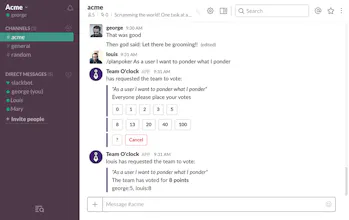
The slack integration for triggering a retro isn't that great since it doesn't allow me to select a team name like the trigger for stand ups do. Since i'm not able to alert a specific team, a random team is generated.
Also it would be great if I was able to export the retrospective review to an external doc. Right now my best option is to copy and paste.
Also about the "I'm done" button, currently when anyone selects that button, the current step will be ended and the next will begin. I don't think this should be expected behavior. It should be that all members must select "i'm done" before the step is ended/ next one is started. For example, when creating notes in the start/stop/continue retro, if a member selects i'm done, cards are revealed even when everyone else isn't finished. everyone should be required to wait before moving on.
@monique_hall Thank you for your feedback, very helpful and we have actually managed to address your points. In detail:
1. You can now use the /retrospective @ command to trigger a retrospective for a specific team, regardless the channel name, e.g. "/retrospective @sales Quarterly review".
2. On the timeline, you can now export all activities (standup, retrospective, planning poker sessions) as PDF, DOCX or TXT files.
3. The issue with the "I'm done" was a hiccup in the UX. After you click "I'm done" a "Proceed now" action is revealed in order to force move to the next step in case a participant is facing issues. Now, when a user is clicking the "Proceed now" a confirmation modal will appear instead of invoking an immediate action to proceed to the next step.
Again, thanks for your feedback and we are here to answer/address any other issues you may face.
Report
We've been using teamoclock for more than a year and it made easier to have events with remote teammates and helped us automate a lot of manual work. I don't have to send an email after each event ends and everyone knows what to do even if the Scrum Master is not present.
It doesn't feel bloated with features and complexity and you know each action you do what is going to happen.
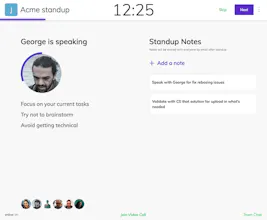
Also, the timer in the stand up is a really discreet way of keeping everyone in time.
@terra_arc as a person who does retrospectives a lot I really appreciate this type of services! :) We would like to offer you to publish an interview about Team O'Clock at https://startupradius.com/ please ping me at paul@startupradius.com for more details if interested
Report
Team O'clock has been a very useful tool when applying Scrum in our team. The standup feature is really efficient in removing little things from our sessions and keeping the team focused. It can also provide analytics to help track if you're doing standups effectively and it's assumptions about the length and structure of the sessions make really good sense.
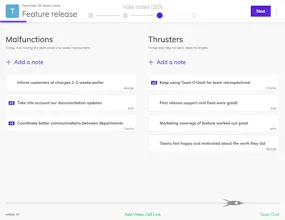
The retrospective activities are very helpful, the fact that you can take notes, convert them into action items and track them over the next sessions is really time-saving. The new custom retrospectives take this to the next level and is a very handy tool in the hands of a passionate Scrum Master.
In general it's a very nice tool that helps Scrum teams stay focused and organized. Big thumbs up to the creators!
Report
A very useful tool in taking your standups / retrospectives to the next level!

We've been using teamoclock for more than a year and it made easier to have events with remote teammates and helped us automate a lot of manual work. I don't have to send an email after each event ends and everyone knows what to do even if the Scrum Master is not present.
It doesn't feel bloated with features and complexity and you know each action you do what is going to happen.
Also, the timer in the stand up is a really discreet way of keeping everyone in time.
Pros:- Great UI/UX
- Retrospectives are really easy
- Keeps us focused and on time on standups
- Great integration with Slack
Cons:No cons yet
A very useful tool in taking your standups / retrospectives to the next level!
Pros:Fast, intuitive and helpful!
Cons:Haven't spotted any so far