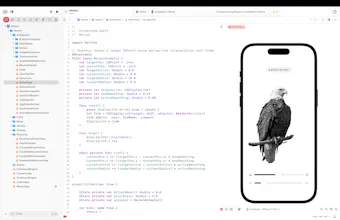
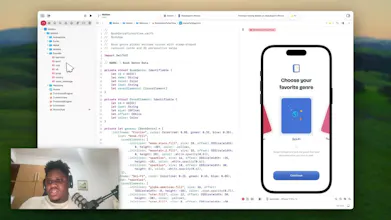
I spent months recreating every animation I saw in top App Store apps. 58 animations. 5 games. 31 Metal shaders. Zero dependencies. → Text effects: liquid, glitch, magnet, vortex, typewriter → Image effects: parallax, chromatic, noise dissolve, halftone → Buttons: Duolingo 3D, jelly, neon glow, liquid fill → 5 playable games in pure SwiftUI → 5 production-ready welcome screens with haptics Clone → Open in Xcode → Run.
Hey PH 👋
I kept hitting the same wall: I'd see a slick animation in an app, think "I need that," then waste days trying to figure it out from scratch.
So I started building a personal reference. One Xcode project where I'd recreate every animation I came across.
Months later, it turned into this:
• 15 text animations with custom Metal shaders
• 13 image effects (parallax, chromatic aberration, noise dissolve...)
• 6 button styles (Duolingo 3D, jelly, neon glow...)
• 5 playable games built entirely in SwiftUI
• 5 complete welcome screen flows with haptics
• 31 Metal shader files
Everything is open source. Every animation is a self-contained SwiftUI view — no wrappers, no abstractions. Just clone, open in Xcode, and run.
I'm a solo iOS developer. I built this because I believe more apps should feel alive, and no one should have to spend a week figuring out how to make text wobble.
If you're looking for an iOS developer who obsesses over animation details like these — I'm available for hire. Link in the repo.
What animation should I build next? 👇
Report
@emmanuel_ajaga Bro, this is absolutely fire. Hands down the most complete, well-structured learning repo I've come across since I started vibe coding back in '25.
Real talk though — most of us who got into coding because of the vibe coding wave (zero iOS background) keep running into the same problem: you see all these slick, polished UIs everywhere, but actually building them? Nearly impossible. There's a serious lack of good open-source projects to study, and trying to reverse-engineer that stuff yourself is a massive time sink. Even after sinking hours into it, getting that level of polish through pure vibe coding feels like a pipe dream.
So huge thanks for putting in the work and open-sourcing this — it's genuinely helped me a ton.
Keep at it. What you're doing here actually matters.
Report
The Metal shaders are gorgeous. Honest question though- how do these perform on older hardware? I'm thinking iPhone 12 era and below where the GPU budget gets tight fast. Also curious if you hit any SwiftUI layout thrashing issues when composing multiple animations on one view.
Mirror
@emmanuel_ajaga Bro, this is absolutely fire. Hands down the most complete, well-structured learning repo I've come across since I started vibe coding back in '25.
Real talk though — most of us who got into coding because of the vibe coding wave (zero iOS background) keep running into the same problem: you see all these slick, polished UIs everywhere, but actually building them? Nearly impossible. There's a serious lack of good open-source projects to study, and trying to reverse-engineer that stuff yourself is a massive time sink. Even after sinking hours into it, getting that level of polish through pure vibe coding feels like a pipe dream.
So huge thanks for putting in the work and open-sourcing this — it's genuinely helped me a ton.
Keep at it. What you're doing here actually matters.
The Metal shaders are gorgeous. Honest question though- how do these perform on older hardware? I'm thinking iPhone 12 era and below where the GPU budget gets tight fast. Also curious if you hit any SwiftUI layout thrashing issues when composing multiple animations on one view.