Launching today

Sunwake
Your iPhone becomes a sunrise alarm clock
7 followers
Your iPhone becomes a sunrise alarm clock
7 followers
Sunwake turns your iPhone into a sunrise alarm clock. A drawn sun sets in the evening, the night stays dark with stars, the real moon and a dim red clock, and before your alarm the sun rises slowly. Real iPhone alarms. No account, no ads.


Free Options
Launch Team / Built With


Render: Get up to $100K in startup creditsThe fastest way to deploy and scale apps and agents
Promoted
Hey.. I'm Lennox, a solo iOS developer from Germany.
I wanted a wake-up light, but not another device on my nightstand. My iPhone is already there, charging. So I built Sunwake.
How a night works:
• Evening: a drawn sun sets on the screen (10, 20 or 30 minutes)
• Night: the screen stays black with stars, the moon in its real phase and a dim red retro clock
• Morning: the sun rises slowly (up to 30 minutes), and the screen gets brighter and brighter
• Three wake styles per alarm: Light first (the room is bright when the alarm rings), Alarm first, then light (it rings in the dark, then the sun rises) or Up right away (a short 10 minute sunrise)
• Every alarm is a real iPhone alarm via AlarmKit, so it rings even when the app is closed
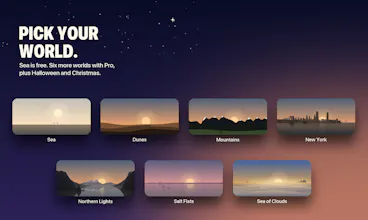
Free: multiple alarms, 11 alarm tones, sunset, night, sunrise and the Sea world.
Sunwake Pro adds Dunes, Mountains, New York and Northern Lights plus the new Salt Flats and Sea of Clouds, seasonal worlds (Halloween until Nov 1, Christmas in December) and the real sky: clouds, rain and snow from Apple Weather. Yearly with a 7-day free trial, quarterly, or lifetime.
No account, no ads, no tracking.
One honest note: iOS doesn't let apps turn the screen on by themselves, so Sunwake stays open overnight. It works on battery too, but the charger is the comfiest spot.
I'd love your feedback, especially on the worlds and the night screen. Which world should I draw next?