Launching today

SubShelf
Folders for your YouTube subscriptions, sorted in one click
2 followers
Folders for your YouTube subscriptions, sorted in one click
2 followers
SubShelf adds folders to YouTube's sidebar and sorts all your subscriptions into them in one click, offline. Open a folder to see only its videos, with dots for new uploads. Free, no account, nothing leaves your browser.



Free
Launch Team

Atlassian LoomShow, don't just tell with Loom
Promoted
Hi Product Hunt! I'm Shourya, and I built SubShelf because my YouTube subscriptions had turned into one endless list.
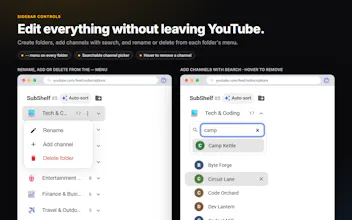
SubShelf puts folders right inside YouTube's left sidebar. One click sorts every channel into folders like Tech, Gaming or Music. It's offline and instant, even with 500+ subscriptions. Then you click a folder, or a chip above the feed, to see only those channels' videos.
The last week was shaped by Reddit feedback, three releases in a few days:
• Dots on folders and channels with new uploads, like YouTube's own
• Ctrl+drag a channel to put it in two folders, and drag folders to reorder them
• Smarter sorting (homelab channels no longer land in Food & Lifestyle)
A few choices I made on purpose:
• Free, no account, no servers. Your folders live in your browser, with Export / Import for backups.
• It never downloads AI models. The offline sorter learns from every channel you drag to another folder.
• Open source, and it only runs on www.youtube.com (Chrome and Edge).
What would you want next? Next on my list is a merge-or-replace preview for imports.