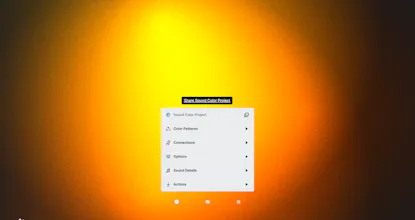
The Sound Color Project began as a way to find ways to provide accessibility to music through visual attributes such as light, color, and texture. As the project evolves, it continues to move forward with the mission of exploring multisensory accessibility.
Kevin and I have been working on Sound Color Project, building a tool called SOVIS, which converts sound into color and light.
The SOVIS product uses an audio input source — device microphone, USB audio interface — to analyze frequency and volume. Using a defined color pattern and mapping audible to visual attributes, the frequency and volume are translated into color, light, and texture.
SOVIS is built on Javascript and utilizes the Web Audio API. It never stores or transmits audio, but simply uses it to drive the color patterns seen on screen.
SOVIS can be installed as an app. This will add an app icon on your home screen if on mobile, or create a browser-based application on a laptop or desktop.
Thorough research has helped us define a variety of ways to translate a sonic element into a visual one. Color patterns currently included are Chromesthesia, Chakras, Emotion, Chromotherapy, Adolescence, and Custom.
SOVIS can be displayed on your phone, computer monitor, TV, projector, and Philips Hue lights, making it easy to use for many applications, such as:
- Music Performances
- Yoga & Meditative Practices
- Chromotherapy Healing
- Speech Visualization
- Sound-to-Color Synesthesia Representation
@dmtors Dude congrats!! This is so creative and I love seeing the design community grow for those with accessibility challenges. Plus, this would add such a nice vibe to yoga practices as you've listed. Is it possible to get it to listen to the audio of the device as well?
@megaroeny Thanks so much! The only way for the same device that is listening to the device that is playing audio, is to turn the volume up. We did try to look into this feature, but it's not so simple. Maybe something we can continue to explore. :)
@yitzchok_ginzberg Thanks! Hmm, if it's already connected to your Hue, you should only need to select a light group then to start the connection. Would you mind emailing me at info@soundcolorproject.com so we can help get it figured out for you?
@yitzchok_ginzberg Once you are logged into Philips Hue, there should be a screen in connections to select a light group after you go into the Philips Hue section. If you could email us, it would be easier to help troubleshoot since we can attach screenshots.
Report
This is more than art. Reminds me of synesthesia. Just. Marvelous.
RokBlok
Sound Color Project
Sound Color Project
Wireframe Components Kit
Sound Color Project
Wireframe Components Kit
Sound Color Project
Sound Color Project