Sort by Tune

Sort by Tune

Free tool to find the best order for any Spotify playlist.

1 follower

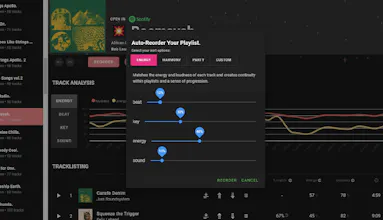
Sort by Tune offers tools to reorder Spotify playlists by algorithmically pairing harmonious songs. Choose automated sorting or manual customization via drag-and-drop, aided by the app's match scores for ideal song sequencing.
Sort by Tune gallery image
Free
Launch tags:MusicSpotify
Launch Team
Tines
Tines
The intelligent workflow platform
Promoted

What do you think? …

Rob Lawn
Maker
📌
Sort by Tune is a bedroom project, an ode to people that obsess over playlists and finding the perfect next track. I grew up in the late 80s/early 90s, making mix tapes with my pride and joy, a knock-off double cassette deck that my Dad brought back from a trip to China. (The very early days had me holding two cassette decks together, playing one and recording on the other, with truly terrible results). Fast forward, and I still find myself making, tweaking, and obsessing over Spotify Playlists. I realise that these days only a few playlists get real airtime, or that most people just go to radio on an artist, or let Spotify's (often brilliant) 'continue playing' feature take over. But I dunno, I use all those things, but I still love having my perfect playlist for every genre, every mood, and most occasions. I find Spotify to be a great resource for finding songs and building playlists, but a playlist without an order is not a playlist. I find the tools that are available to find that order to be tedious and not as helpful as they could be. So over a period of time I made Sort by Tune to have all of (well OK, some of) the features that I wish Spotify would add for power users like myself. At its base is an auto-sort feature, using an algorithm that matches every track with every other track, and then tries to get as many good matches in as it can. I started building that as a way to match tracks by key, using the Camelot wheel. And since I was using Spotify, I started to match songs by Energy, and Loudness and then where their tempos matched. I added a timeline to start to see how my playlists unfolded, and became a little obsessed with the way I could slowly build energy, or mood as a playlist unfolded. I also added a series of tools to use with a standard drag & drop list. It’s got a 'Jump Track' button, and a 'Choose Next' button. I usually (once I’ve auto-sorted the playlist, reversed the order, tweaked the settings, and found an order that looks like it’ll work) play through the playlist in order. When I come to a transition I don’t like, then I either click 'Choose Next', and it displays the songs left in the playlist, by order of how well they match the song I’m on, so I can easily choose the best match, or I click 'Jump Track', and it’ll jump the offending track down to the next best spot in the playlist, getting it out of the way. The app works well, but to be honest, I found working with the Spotify Web Player a little tough, so there are a few bugs (in the player implementation). I’m looking for the inspiration to fix them. Even if nobody else really likes this, I’m happy using it myself, and the player is fine for me. But if there are other playlist nuts out there that might get a kick out of this, then hit me up, tell me to pull my finger out, and wrestle with the Spotify Web Player one last time….
Jerry Zhang
Congrats on the launche! 🚀🚀
Rob Lawn
@hacksman Thanks!