
Slash it
AI reads your Gmail. You just decide. Done in 30 seconds.
8 followers
AI reads your Gmail. You just decide. Done in 30 seconds.
8 followers
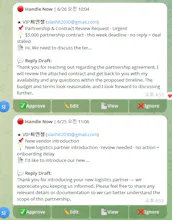
Dan Martell's Buy Back Your Time changed how I think about email. His system: triage your inbox before it triages you. But hiring an EA costs $3,000/month. I built Slash it — AI that does exactly that inside Telegram. Before you open Gmail, AI pre-reads every email: 🔴 Handle Now 🟡 Check Today ⚪ FYI Reply draft ready. You approve or ignore. Gmail stays closed. No app install. No learning curve. Connect Gmail → type /start → done in 30 seconds. Built by a 57 construction manager.



Free Options
Launch Team / Built With


Framer AI AgentsDesign and publish professional sites with AI
Promoted
Hey PH! I'm Minchul, 57, from Korea.
20 years ago I was in B2B sales.
Came back from a 3-day trip.
100 emails waiting.
One client email buried under newsletters.
By the time I found it — they'd already moved on.
That moment never left me.
Last year I read Dan Martell's Buy Back Your Time.
He said hire an EA to triage your inbox.
That costs $3,000/month.
I had no coding background.
So I built it with AI instead. For $39/month.
Connect Gmail → Type /start → 30 seconds.
🔴 Handle Now / 🟡 Check Today / ⚪ FYI
No app. No learning curve. Just Telegram.
7-day free trial. Cancel anytime.
Use code PH20 for 20% off forever.
What email have you regretted missing the most?
— Minchul
Curious how the AI decides what lands in Handle Now vs Check Today, is it purely keyword based or does it actually learn from how I handle things over time?
@zcanuslusoiuah Great question!
It's a 3-layer system:
1. Rule-based first — sender reputation, subject keywords, billing signals
2. AI judgment — Claude analyzes context, urgency, relationships
3. Personalization — it learns from your approval patterns over time. VIP senders you engage with move up, newsletters you ignore get filtered down.
The more you use it, the sharper it gets.
Would love for you to try it — honest feedback welcome 🙏
How does it actually handle emails that need a longer back and forth, like scheduling a meeting with a few people? Does the draft account for that or am I still jumping back into Gmail?
Great question — and honest answer: for simple one-shot replies, the draft works great. For multi-round scheduling with several people, the draft gives you a strong starting point but you'll likely refine it.
What Slash it actually saves you is the triage step — knowing which emails need that back-and-forth attention vs. which ones you can approve in 2 seconds.
Calendar conflict detection is on the roadmap. For now, it flags scheduling emails as 🔴 Handle Now so nothing slips through.
How does the pricing work since you mentioned an EA costs 3k a month, is this a subscription or one time?
@elasezik6181 Great question! Three options:
💳 Monthly — $39/mo (cancel anytime)
📅 Annual — $290/yr (38% off)
🔒 Lifetime — $490 (one-time, pay once use forever)
All include a 7-day free trial. Use code PH20 for 20% off forever.
vs. an EA at $3,000/month — that's about 1.3% of the cost 😄