
Shortcuts AI
Your personal AI Agent on iPhone and more
13 followers
Your personal AI Agent on iPhone and more
13 followers
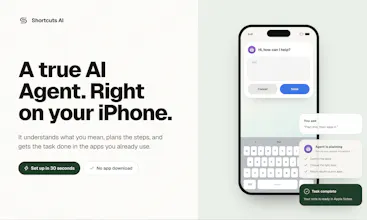
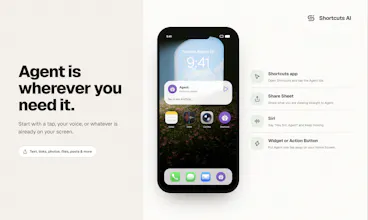
Shortcut AI works with built in Shortcuts app on your iPhone. No extra app to download. Describe what you want in plain language, and it gets it done across apps. Unlike Siri, it understands more complex requests and can carry them through. Unlike ChatGPT, it doesn't stop at giving you an answer. Shortcuts AI Agent takes action on your Apple devices. Set it up once and use it by text, voice, or sharing content to Agent. Your choice of AI model. Your own instructions.

Free Options
Launch Team / Built With


Customer.ioAutomate Messaging Everywhere — Startups Get 12 Months Free
Promoted


Hi Product Hunt 👋
I’m Jessie.
Have you ever gotten an answer from AI on your iPhone, then realized you still had to do the rest yourself?
That’s the gap we built Shortcuts AI to close.
What Shortcuts AI does
Shortcuts AI is a personal AI agent built on Apple’s Shortcuts app. There’s no separate app to download, and you don’t need to know how the Shortcuts app works.
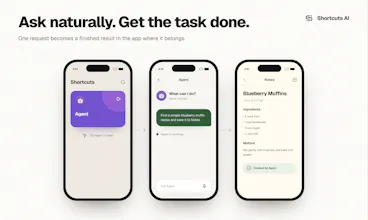
Just tell the Agent what you want in plain language. It figures out the steps, uses available actions across Apple apps and supported third-party apps, and gets things done.
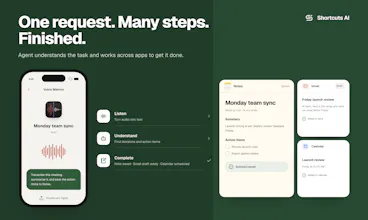
That could be something simple like saving information to Notes, creating a reminder, or adding an event to Calendar. It can also handle multi-step requests that involve more than one action.
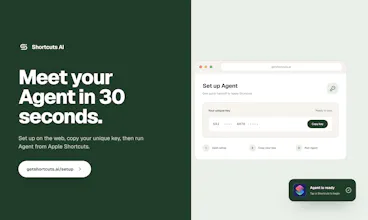
Set it up once on your iPhone, and you can also use the same Agent across your Apple devices.
Make it more personal
For everyday tasks, you can simply ask and go.
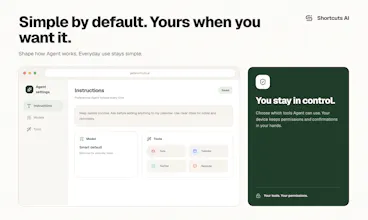
If you want more control, you can choose the AI model that fits your needs, add your own context and instructions, and control which tools and services the Agent can use.
We think this becomes especially useful for people who already use AI every day, small business owners, or anyone who repeats the same multi-step tasks.
Try it and tell us what you think
Every new user gets 500 free credits to try Shortcuts AI. We use usage-based credits instead of a subscription because we think it’s simpler and more transparent.
We’re still actively improving the Agent, and we’d love to hear about the real tasks you try:
What worked? What didn’t? And what do you wish Shortcuts AI could do next?
@jessie_xu1256 We are glad to launch to product hunt. Shortcuts AI is by far the simpliest way to let AI to take actions on your iPhone and other apple devices. You can use it like a AI chat interface, see it take actions and complete you are asking right in front of you. Like an a friendly invisible helping hand!
We would love to see you to try and see it in action.
@weiwangai Yes, and trigger it by voice is very easy too! You can customize your Agent name, such as "Hey Siri Agent", or whatever works for you. Trigger your agent through iPhone, iPad, Apple Watch, Vision pro, or HomePod! Shortcuts AI works across all the apple devices.
It's interesting that we build up Shortcuts AI starting from a regular shortcut in the Shortcuts app.
The Shortcuts app is a genius product that allows people create any shortcut that makes their lives easier, making daily life and work more efficient. But it still feels like coding stuff for a lot of people, and many people never even notice this built-in app on their iPhones.
And at WWDC a few months ago, Apple released iOS 27 beta and new Apple Intelligence features that make shortcut easier to create. However, the barrier is still there and for each task, users still generally need to configure shortcuts around specific workflows.
Do people really need a separate shortcut for every task? Is it going to be another burden to maintain?
Shortcuts AI only needs to be set up once, with just one shortcut. People don't need to know what the Shortcuts app is and how it works. Just chat with it like you would chat with any AI chatbot. It understands you and get things done.
This solution is so simple yet powerful in a way of chaining actions which is regularly performed manually.
Now I could simply share a meeting recording from my voice memos and get stateholder emails drafted and action items created in just a minute right on my iPhone, which used to be tedious process and took me about half an hour to do.