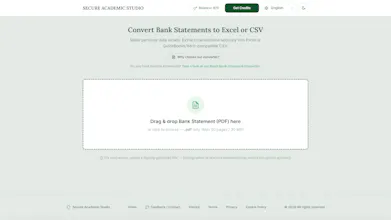
Most converters make you upload your bank statement to a server you know nothing about. We have a different approach. The PDF is rasterized entirely inside your browser. You can mask sensitive data on-canvas before anything is sent. An "Audit ZIP" lets you verify pixel-by-pixel what leaves your device. Only redacted images go to a stateless, EU-based AI – no database, no retained files, no training on your data. Result: a structured Excel file, or a QuickBooks/Xero-compatible CSV.
Fin Startups get Fin free for a year + 93% off Intercom
Promoted
Maker
📌
Hello Product Hunt,
I was looking for a tool to convert my own PDF bank statements into Excel - useful for sorting, filtering, and tracking spending. Plenty of tools exist for this, so I tried one of the popular ones.
My experience was a mixed bag. The very first step already made me think: I needed to upload my statement. I stopped right at this stage. Why? Because what's on the first page of most bank statements? Your name, home address, and account number. So, I tried to answer a couple of questions. Who runs that server? How long will my statement be stored? Will it be deleted? When?
Since I was already on the site, I thought I go through with it anyway, at least out of curiosity. If the result is good, maybe I can live with the risk. So, I uploaded a highly sensitive document. The result was quick: "Sorry, this statement could not be processed." That’s excellent. A zero result for a real privacy risk. That's when I decided to build it properly – or at least much better.
How it works differently here:
• Your PDF is rasterized locally in your browser – the original file never gets uploaded.
• You can redact your name/account number yourself, directly on the page, before anything is sent anywhere.
• An optional "Audit ZIP" lets you verify exactly what would be sent, pixel for pixel, before you send it.
• Only redacted images go to a stateless, EU-based AI – no metadata from the original PDF, no database, no retained files, contractually no model training on your data.
• You get back a structured Excel file or a QuickBooks/Xero-ready CSV.
This application is part of Secure Academic Studio, a small set of privacy-first document tools (proofreading, transcription, invoice conversion, and more) – some of them free, others pay-as-you-go, no subscriptions, no account required.
For the launch, we've bumped the daily free credits to 50 for the next few days - hopefully enough to test the converter without spending anything. Furthermore, we provided a 50% discount code for all our credit packs, as well.
Would genuinely love your feedback, especially from anyone in accounting/bookkeeping who deals with this kind of files daily.
…And if "trust us, it's private" sounds like every other privacy claim you've heard – it’s excellent. We open-sourced the actual mechanisms instead of just describing them: MIT-licensed code excerpts and a dated changelog are available in our public GitHub repository.