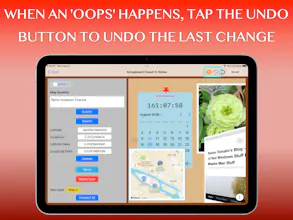
With a 12-year heritage behind the Scrapboard series, Scrapboard Cloud 4 brings the classic concept of a digital bulletin board—recreating the cozy feel of a family refrigerator door—right to your iOS devices. Designed to work hand-in-hand with its macOS counterpart (Scrapboard 4), this app lets you seamlessly sync and share your creative boards across all your iPads, iPhones, and Macs using your iCloud account.
Hello, Product Hunt! 👋
Following up on the release of Scrapboard 4 for Mac, we are thrilled to introduce its mobile companion: Scrapboard Cloud 4 for iOS and iPadOS!
Backed by a 12-year heritage, the Scrapboard series has always been about bringing that cozy, creative, chaotic energy of pinning things to a family refrigerator door right onto your screen. With version 4, mobile and desktop sync together seamlessly via iCloud and CloudKit.
Whether you're away from your desk or sketching out ideas on your iPad on the couch, Scrapboard Cloud 4 lets you create multi-page virtual boards, manage projects, and push/fetch changes instantly. You'll even get instant push notifications whenever edits are synced over from your Mac or another device!
Packed with 6 versatile layer types right in your pocket:
📝 Text: Full typography, font families, text sizes, and custom colors.
🖼️ Picture: Pull straight from your photo library or device storage.
SF Symbol: Clean, native scalable Apple icons.
⏰ Appointment: Real-time countdowns and flexible reminder intervals.
🌐 Web: Live embedded web content via URL.
📍 Map: Precise GPS locations and landmark search lookups.
It’s built to feel completely native, fast, and delightful to use. We would love for you to check it out on the App Store, test out the cross-device sync with your Mac, and let us know your thoughts or questions below. The following is its support site. https://blog.mhvt.net/?p=8100 Please let us know there if you have feature requests. Cheers! 🚀
Quick Sub 2: Video Subtitling