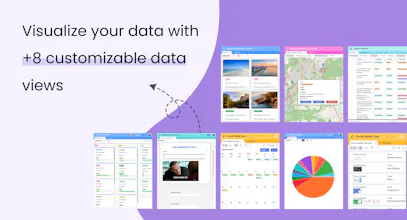
Retable is a customizable online spreadsheet tool that helps you easily create smart business apps with your data. Breathe a new life into your data management with automation, smart data views, +30 column types, team management, and several templates.
@niyogi Hi Roj, it sounds like you're touching on a common challenge many users face with hybrid spreadsheet/database tools—balancing extensive data handling capabilities with user interface and performance. The 50K record limit you mentioned is often imposed by some platforms to maintain system performance and stability. Handling large volumes of data can significantly impact how quickly the system responds and processes requests, especially in a cloud-based, multi-user environment. In Retable, we work continuously on our backend architecture to ensure that it can scale effectively as data volumes grow. This helps in supporting larger datasets more efficiently. Our development team prioritizes performance enhancements to ensure that even as the amount of data grows, the responsiveness and speed of our platform stay outstanding. Soon, we will offer an additional 50,000 record capacity available for purchase through add-ons, ensuring you can scale your data management as needed. Your feedback is crucial as we continue to enhance Retable and ensure it meets the diverse and expanding needs of our users. Please reach out to us to address your specific challenges and needs!🚀
Report
Is it possible to upload my files into Retable from Google Sheets without exporting them?
@erkam_karadogan Hi Erkam! Of course you can! In your spreadsheet just click the add new button on the top left corner. After selecting “Import Google Sheets” a pop-up window will open. Sign in to your Google account, select the file you want to upload, and click upload. Enjoy managing your data in Retable with just a few clicks! 😊
Report
Is there a difference between sharing a workspace and sharing an organization?
@kaan_eralp Hey Kaan! ☺️ There are so many sharing options in Retable where you can securely share your data. You can share your workspace by adding email addresses, simply tagging people who are on your team, or inviting by a link. Ask for your projects, you can copy the link or embed the table to your website. ☄️
Report
No-brainer for data storing and creating workflows +++ -> more affordable compared to alternatives. More benefit less cost 🥷🏻
@ayca_begum_kilic Hey Begum! It's great that you're exploring the API features! 🚀 Regarding your API key, your API key does not expire, and you can generate up to two API keys per account. You have the flexibility to disable a key whenever necessary. It's important to note that API keys are exclusive to each user and should not be shared with anyone to ensure the security and integrity of your data. Always use your own key to maintain control over your projects and data access. If you have any more questions or need further assistance with API keys or any other features, feel free to ask! 🚀💻
Grok Button
Retable
Retable
Retable
Retable
Cluing
Peaka
Retable