Reseed is a CLI that extracts a real design system from any URL — colors, type, spacing, motion — and drops it into your repo. Your AI editor (Cursor, Claude Code, Windsurf) reads it on the next prompt, and stops generating gradient-pink AI-demo UI.
No reviews yetBe the first to leave a review for Reseed
Maker
📌
Hey Product Hunt 👋 — I built Reseed because I was tired of the same thing every Cursor / Claude Code user is tired of:
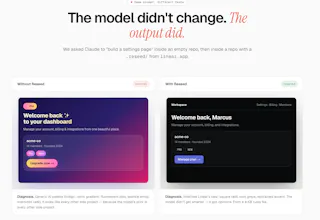
You ask the model to "build a settings page." It ships a purple-to-pink gradient, fluorescent pill buttons, a ✨ emoji, and 24px border-radius on everything. Doesn't matter how good your prompt is. The model's prior is every other AI demo, so that's what it reverts to.
Reseed fixes this at the source. One command:
npx reseed-cli init https://linear.app
…and 23 seconds later, four files land in `.reseed/`:
• design-system.md — named tokens + prose rules
• theme.css — drop-in CSS variables
• design-reference.html — a visual reference page
• the raw source for re-extraction
Then it appends ONE idempotent block to whichever rules file your editor reads (CLAUDE.md, .cursor/rules, AGENTS.md, copilot-instructions.md — auto-detected). Next prompt, the editor obeys.
Three things I'd love feedback on:
1. The before/after on the homepage — does it land?
2. Pricing is one tier ($19/mo, 15 extractions). Too simple? Too expensive?
3. Editors I'm missing? Currently auto-detect Cursor, Claude Code, Windsurf/Cline, Copilot.
3 free extractions, no card, no signup. Delete `.reseed/` to rip it out. Would love your honest take 🙏
Beyond colors/type/spacing, every extraction captures:
• Component patterns: button variants (primary/ghost/destructive), card anatomy (padding, radius, border vs shadow), input styling (border, focus ring, label placement), nav items, badges. Each one comes back as real class strings + a one-line rule (e.g., "Buttons never use gradients; primary is the indigo accent on near-black").
• Layout rules: container max-width, section vertical rhythm, grid column counts and gaps, whether the site uses bento layouts vs straight stacks, where dividers/borders carry the structure vs whitespace.
• Motion grammar: the cubic-bezier curves, durations, hover patterns, and entrance animations. This is the one most tools skip, and it's why AI-generated UI always feels "off" even when the colors are right.
@khaled_waleed
How far does Reseed go beyond visual tokens? Does it also capture component patterns and layout rules?
@dmitrii_volosatov
Yes, visual tokens are the floor, not the ceiling.
Beyond colors/type/spacing, every extraction captures:
• Component patterns: button variants (primary/ghost/destructive), card anatomy (padding, radius, border vs shadow), input styling (border, focus ring, label placement), nav items, badges. Each one comes back as real class strings + a one-line rule (e.g., "Buttons never use gradients; primary is the indigo accent on near-black").
• Layout rules: container max-width, section vertical rhythm, grid column counts and gaps, whether the site uses bento layouts vs straight stacks, where dividers/borders carry the structure vs whitespace.
• Motion grammar: the cubic-bezier curves, durations, hover patterns, and entrance animations. This is the one most tools skip, and it's why AI-generated UI always feels "off" even when the colors are right.
• Navigation style: fixed/sticky, blur backdrop, height, link weight, active-state treatment.
@khaled_waleed Thanks for explaining