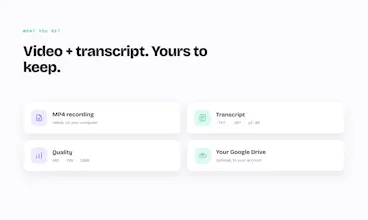
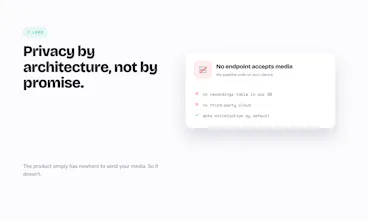
Gravô Meet records Google Meet 100% on your machine — no bot in the call, nothing uploaded to anyone's cloud. The video and transcript stay with you, on your PC and your own Google Drive. Privacy by architecture, not by promise.
No reviews yetBe the first to leave a review for Record Google Meet locally
Maker
📌
Hi Product Hunt! I'm Samir. I've spent 15 years building products, and meeting recorders always bugged me: they drop a bot into your call that everyone sees, and they upload your recording to their cloud — often outside your country.
For anyone recording calls with clients or candidates, that's a real problem — there's personal data in there.
So I built the opposite. Gravô Meet records Google Meet 100% on your machine. No bot in the call. Nothing reaches our servers — there isn't even a recordings table in our database. The MP4 and transcript stay on your computer, and go to your own Google Drive only when you choose.
Free to start. I'd love your honest feedback on the local-first approach — and where it should go next!
LINK CHROME WEB STORE: https://chromewebstore.google.co...
Report
Recording locally is a big plus for privacy. One thing that would make it even better for me would be the ability to set automatic split points in the recording, so long meetings get broken into timestamped chapters I can jump back to without scrubbing through the whole video.
Report
Maker
@abdulsametzsiq Love this, and you spotted a real gap. Today the transcript helps you jump around, but you're describing something better: timestamped chapters that make a 60-min call skimmable. Adding it to the roadmap. Quick one so I build the right thing — would you rather have auto-detected breaks (on topic/speaker changes) or a hotkey to drop your own markers mid-meeting? Thanks for the sharp feedback.
Report
Maker
@abdulsametzsiq we liked your suggestion so much that we added this feature. There is now an option to create crop marks.
Enjoy, is free!
Report
Finally a Meet recorder that doesn't add a sketchy bot to the call. It just saved the video and transcript straight to my Drive, and the fact that nothing leaves my machine is a huge plus for client calls.
Report
Maker
@sattapanbmta Thank you — this made my launch day. Client calls are exactly what I built it for: you shouldn't have to route a customer conversation through someone else's servers just to keep a record. Really glad the Drive save and the no-bot flow worked cleanly for you. If anything ever feels off there, tell me — I read every message.
Report
The local-only approach is such a thoughtful choice, especially the part about syncing to your own Drive rather than forcing another login. Finally a meeting recorder that respects the room.
Report
Maker
@zeynepekerlqng "Respects the room" — I might steal that line. That was the whole idea: no bot, no extra account, no forcing your data through us. It saves to your Drive because it's your data, full stop. Thanks for getting it — means a lot today.
Recording locally is a big plus for privacy. One thing that would make it even better for me would be the ability to set automatic split points in the recording, so long meetings get broken into timestamped chapters I can jump back to without scrubbing through the whole video.
@abdulsametzsiq Love this, and you spotted a real gap. Today the transcript helps you jump around, but you're describing something better: timestamped chapters that make a 60-min call skimmable. Adding it to the roadmap. Quick one so I build the right thing — would you rather have auto-detected breaks (on topic/speaker changes) or a hotkey to drop your own markers mid-meeting? Thanks for the sharp feedback.
@abdulsametzsiq we liked your suggestion so much that we added this feature. There is now an option to create crop marks.
Enjoy, is free!
Finally a Meet recorder that doesn't add a sketchy bot to the call. It just saved the video and transcript straight to my Drive, and the fact that nothing leaves my machine is a huge plus for client calls.
@sattapanbmta Thank you — this made my launch day. Client calls are exactly what I built it for: you shouldn't have to route a customer conversation through someone else's servers just to keep a record. Really glad the Drive save and the no-bot flow worked cleanly for you. If anything ever feels off there, tell me — I read every message.
The local-only approach is such a thoughtful choice, especially the part about syncing to your own Drive rather than forcing another login. Finally a meeting recorder that respects the room.
@zeynepekerlqng "Respects the room" — I might steal that line. That was the whole idea: no bot, no extra account, no forcing your data through us. It saves to your Drive because it's your data, full stop. Thanks for getting it — means a lot today.