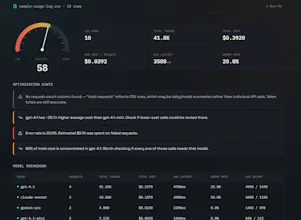
Upload your OpenAI, Claude, or Gemini usage export. Find token waste, model overkill, and failed-request cost — instantly, in your browser. No API keys, no server upload.
No reviews yetBe the first to leave a review for ReasoningDensity
Maker
📌
Hey everyone!
I've been building a few side projects using Claude (haiku, sonnet, opus, fable) and ChatGPT, picking models depending on the task — heavier models for detailed coding/audits, lighter ones for simple stuff. But my API usage kept climbing and I honestly had no clear picture of where the money was going.
Every tool I found wanted an API key connected or an account just to check usage, which felt like overkill for something I just wanted a quick answer to.
So I built ReasoningDensity — you drop in your usage CSV (works with OpenAI's and Anthropic's exports) and it shows a cost/token breakdown per model, plus plain-language flags like "this model costs 6x more per call than that one." Runs entirely in the browser, nothing gets uploaded anywhere, no signup.
Still pretty early — no accounts, no saved history yet, just upload and see. Would love feedback, especially from anyone who's tried other provider exports (Gemini support is still rough).
Thanks for checking it out!
Report
Love that it runs fully in the browser, feels way safer than uploading usage data anywhere. One thing that would help me actually act on the findings: a "potential monthly savings" estimate per category next to each flagged issue, so I can quickly prioritize which switches or prompt fixes actually move the needle on my bill.
Report
Maker
@erifeuanoljom2 good idea, right now it just flags the issue but doesn't estimate $ impact. adding a rough savings estimate per flag is on my list, thanks for the specific ask..
Report
this is genuinely useful, been wanting something like this for a while since my api bills keep creeping up and i can never tell why. one thing that would be clutch is letting me compare months side by side so i can see if my optimizations are actually moving the needle or if im just rearranging deck chairs
Report
Maker
@sedanurululuuz yeah this comes up a lot, month-over-month comparison would need some kind of local storage since right now nothing's saved anywhere. thinking about how to do that without breaking the "nothing leaves your browser" thing
Report
The fact that everything runs in the browser without touching a server is genuinely impressive. Most token dashboards feel sketchy because they demand API keys, but skipping that step entirely makes this feel trustworthy from the first click.
Report
Maker
@erdoanicdw thanks, that was really the main design constraint from day one - if it needed an api key I probably wouldn't trust it myself either lol
Report
honestly this looks super useful and the whole no-upload thing is a nice touch. one thing though, would be cool if you could track costs over time with like a sparkline chart per model, so I can quickly see if my spending is trending up or down across weeks.
Report
Maker
@sabritumtu75832 that's a good one, trend over time is something I'm missing right now. noted
Report
Running everything in the browser is great, but a way to save and compare reports over time would really help. Like, snapshot this month's spend profile and then check next month to see if the optimizations actually moved the needle.
Report
Maker
@tahirtahmaz seeing this request a few times now (comparison over time) - makes sense, it's the natural next step once you've checked it once. need to figure out the local-only way to do it though
Report
Dropped in my OpenAI export and it immediately flagged a bunch of oversized gpt-4 calls I'd been ignoring for months. Loved that nothing left my browser.
Report
Maker
@gkhangzeyy3cr this is exactly the use case I built it for, glad it actually caught something real. thanks for trying it with your own data
Love that it runs fully in the browser, feels way safer than uploading usage data anywhere. One thing that would help me actually act on the findings: a "potential monthly savings" estimate per category next to each flagged issue, so I can quickly prioritize which switches or prompt fixes actually move the needle on my bill.
@erifeuanoljom2 good idea, right now it just flags the issue but doesn't estimate $ impact. adding a rough savings estimate per flag is on my list, thanks for the specific ask..
this is genuinely useful, been wanting something like this for a while since my api bills keep creeping up and i can never tell why. one thing that would be clutch is letting me compare months side by side so i can see if my optimizations are actually moving the needle or if im just rearranging deck chairs
@sedanurululuuz yeah this comes up a lot, month-over-month comparison would need some kind of local storage since right now nothing's saved anywhere. thinking about how to do that without breaking the "nothing leaves your browser" thing
The fact that everything runs in the browser without touching a server is genuinely impressive. Most token dashboards feel sketchy because they demand API keys, but skipping that step entirely makes this feel trustworthy from the first click.
@erdoanicdw thanks, that was really the main design constraint from day one - if it needed an api key I probably wouldn't trust it myself either lol
honestly this looks super useful and the whole no-upload thing is a nice touch. one thing though, would be cool if you could track costs over time with like a sparkline chart per model, so I can quickly see if my spending is trending up or down across weeks.
@sabritumtu75832 that's a good one, trend over time is something I'm missing right now. noted
Running everything in the browser is great, but a way to save and compare reports over time would really help. Like, snapshot this month's spend profile and then check next month to see if the optimizations actually moved the needle.
@tahirtahmaz seeing this request a few times now (comparison over time) - makes sense, it's the natural next step once you've checked it once. need to figure out the local-only way to do it though
Dropped in my OpenAI export and it immediately flagged a bunch of oversized gpt-4 calls I'd been ignoring for months. Loved that nothing left my browser.
@gkhangzeyy3cr this is exactly the use case I built it for, glad it actually caught something real. thanks for trying it with your own data