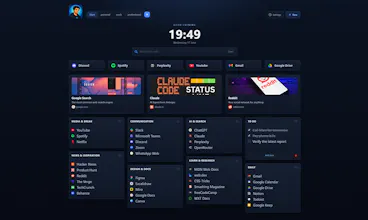
Your new tab, turned into a command center. ReadyTab gives you a drag-and-drop dashboard with multiple spaces, beautiful themes, and Spotlight ā search and launch everything from any page: links, clipboard snippets, and even local apps, files, and folders through a cross-platform companion. Share boards as snapshots or managed boards, sync across devices, and keep everything local-first by default.

No reviews yetBe the first to leave a review for ReadyTab
Viktor.comAn AI coworker that actually does the work
Promoted
Maker
š
I'm Yann, the maker of ReadyTab.
Every new-tab extension I tried was either a pretty wallpaper or a wall of bookmarks I stopped looking at.
I wanted the opposite: a new tab that's the fastest place to start anything ā open a link, jump to a project, copy a snippet, launch an app ā without breaking my flow.
So I built ReadyTab. A few things I'm proud of:
šļø Spaces ā separate dashboards for work, side projects, and life, each with its own layout and theme.
šØ Make it yours ā drag-and-drop groups and 13 built-in themes, plus a full visual theme editor (no CSS required).
š The companion ā a tiny cross-platform app (Windows/macOS/Linux) that lets your new tab open real files, folders, and apps. This is the part I haven't seen anywhere else.
ā” Spotlight ā hit Ctrl+Space on any page to search and launch everything: links, clipboard snippets, and even local apps, files, and folders.
āļø Optional sync + sharing ā snapshot a board to share it, or sync across devices. It's local-first by default, and your workspaces export and import as plain JSON ā free, no lock-in.
š„ Start in seconds ā import your existing browser bookmarks and you've got a full dashboard on day one.
ReadyTab is free to use, with a Pro tier for the power features (unlimited spaces, cloud sync, sharing).
I'd genuinely love your feedback ā what's missing, what feels off, what you'd want it to do next. I'll be here all day answering everything. š
Thanks for checking it out!
ā Yann