
QuickTranslate
Translate any webpage text in 2 steps, no copy-paste, no OCR
5 followers
Translate any webpage text in 2 steps, no copy-paste, no OCR
5 followers
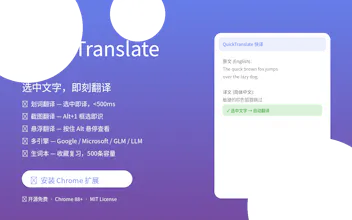
QuickTranslate is a free Chrome extension for instant translation. Select text → translate in <500ms. No tab switching. • Select & Translate (Google/Microsoft/GLM/LLM) • Screenshot OCR (Alt+1) — PDFs, images • Hover Translate (hold Alt) — read uninterrupted • Floating Panel (Ctrl+Shift+Q) • Vocabulary Book (500 words) • 10+ languages, MIT open source Chrome Store → [link] GitHub → github.com/kany2000/QuickTranslate



Free
Launch Team / Built With


Framer AI AgentsDesign and publish professional sites with AI
Promoted
Hey everyone! 👋 I built QuickTranslate because I was tired of switching between multiple translation extensions — one for selection, one for hover, one for screenshots. So I built one that does everything, with a module system so you only load what you need.
What started as a simple "select to translate" tool evolved into a full modular platform with 12 built-in modules, 4 translation engines, and even a processor pipeline that sanitizes text and protects code blocks.
It's fully open-source (MIT), and developers can create their own .qt-module files to extend it.
Would love your feedback! 🧩
# QuickTranslate - Product Hunt Launch Draft
## Tagline
Instant browser translation at your fingertips — select, translate, done.
---
## Headline
QuickTranslate — The modular Chrome extension that translates text instantly across 5 engines, with dark mode, inline translate, and an extensible plugin system.
---
## Description
QuickTranslate is a free, open-source Chrome extension that transforms how you read foreign languages on the web. Select any text and get instant translations — no new tabs, no copy-pasting, no context switching.
### ✨ What makes it different
Modular architecture. Unlike other translation extensions, QuickTranslate has a built-in module system (6 module types, 12 built-in modules). Third-party developers can create and distribute their own modules as `.qt-module` files.
Multi-engine. Google, Microsoft Translator, GLM (Zhipu), and custom OpenAI-compatible LLMs — you choose your preferred engine or compare results side by side.
Privacy-first. Your API keys are stored locally in your browser. No user accounts, no data collection, no servers. Everything runs in your Chrome.
---
### 🚀 v3.2.0 — What's New
- Inline Translate — Select text and get a draggable translation popup instantly. No buttons to click, no extra steps. Click the header to dismiss, drag the body to reposition.
- Quick Settings Toggle — Enable/disable Inline Translate directly from the main popup.
- Multi-language UI — All new features support 5 languages (English, 简体中文, 繁體中文, 日本語, 한국어).
- Dark Mode — Automatic dark mode follows your system theme across all panels.
- Translation Cache — Repeated translations skip the API. 200-entry LRU cache for instant results.
- Text Sanitizer — Auto-cleans whitespace, line breaks, and HTML entities from selected text.
- Code Protection — Code blocks wrapped in backticks are preserved during translation.
- Context Menu — Right-click any selected text to translate with a draggable result bubble.
- Google Translate 429 Fix — Automatic retry logic (1s → 3s → 5s backoff) when rate limited.
---
### 📦 Features
| Feature | Description |
|---------|-------------|
| Selection Translate | Select text → instant translation popup |
| Inline Translate | Select text → auto-translate, no buttons needed |
| Hover Translate | Hold Alt + hover over text |
| Screenshot Translate | Capture area → OCR → translate |
| Multi-Engine | Google, Microsoft, GLM, Custom LLM |
| Dark Mode | Follows system theme, all panels supported |
| Text Sanitizer | Auto-clean whitespace & HTML entities |
| Translation Cache | 200-entry LRU, skip API for repeated text |
| Context Menu | Right-click → Quick Translate |
| History & Word Book | Auto-save history, save favorite translations |
| Module System | Extend with plugins (6 types) |
| Module Store | Built-in marketplace with downloadable modules |
| 5-Language UI | English, 中文, 日本語, 한국어 |
---
### 🔧 Built-in Modules (12)
| Module | Type | Description |
|--------|------|-------------|
| Google Translate | translator | Free Google Translate API |
| Microsoft Translator | translator | Microsoft Translator API |
| GLM | translator | Zhipu GLM large language model |
| Custom LLM | translator | OpenAI-compatible custom LLM |
| Selection Translate | mode | Popup on text selection |
| Float Panel | mode | Ctrl+Shift+Q floating panel |
| Inline Translate | mode | Auto-translate on selection |
| Text Sanitizer | processor | Auto-clean text formatting |
| Code Protector | processor | Protect code blocks from translation |
| Translation Cache | service | LRU cache, 200 entries |
| History | service | Translation history storage |
| Word Book | service | Saved words management |
---
### 🔗 Links
- Chrome Web Store: https://chromewebstore.google.com/detail/quicktranslate-快译/dacnbehjlfoahneibfabeoipbkfgegba
- GitHub: https://github.com/kany2000/QuickTranslate
- Website: https://qtrans.737703.xyz
- Documentation: https://qtrans.737703.xyz/docs/spec.html
---
### 🏷 Tags
#ChromeExtension #Translation #Productivity #OpenSource #BrowserExtension
---
### 👥 Suggested Makers
kany2000
---
### 💡 Tips for Product Hunt listing
1. First screenshot: Show the inline translate feature — select text on a webpage with the translation popup visible
2. Second screenshot: Show the dark mode version
3. Third screenshot: Show the module management UI with all toggles
4. GIF: Record a screen capture showing: select text → inline translate → drag popup → click header to close
5. Tags: Productivity, Chrome Extensions, Developer Tools