
QuickQuill
Private, on-device meeting notes for Mac
98 followers
Private, on-device meeting notes for Mac
98 followers
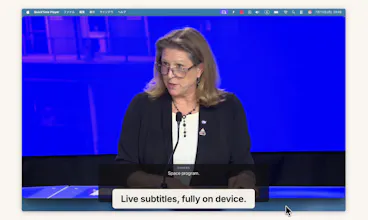
QuickQuill records your meetings and turns them into transcripts and summaries, and nothing is ever sent to the cloud. No bot joins the call, and it keeps working with Wi-Fi off, which is how the demo video was recorded. It also shows live subtitles with translation while you record, and there's push-to-talk dictation for any app. No account, no subscription. Dictation is free forever, and a single $49 purchase unlocks the full meeting workflow. Requires macOS 26 on Apple Silicon.




Free Options
Launch Team / Built With


Dropbox SignSimple, secure eSignatures for the way your team works.
Promoted


Wi-Fi-off is convincing. The ugly leak is usually after the meeting: Spotlight indexing, Time Machine, cloud-synced folders, crash logs. Where does QuickQuill store raw audio, and is it encrypted or deleted before any of those can see it?
@wybaby168
Dictation audio never touches disk, it's processed in memory and discarded. Capture audio exists on disk only while recording, in a crash-recovery directory under Application Support, and is deleted the moment recording stops. The app doesn't add its own encryption on top, disk encryption is left to FileVault.
That’s a clear boundary. Memory-only dictation and deleting the crash file on stop are exactly the details I wanted. Thanks for answering plainly.
on-device is the right call for meeting notes specifically, that's exactly the kind of content people would never send to a cloud API if they stopped to think about it. how's battery/CPU usage during a long call, is it light enough to run in the background through a 2 hour meeting without you noticing the fan spin up
@omri_ben_shoham1
Good question, and the architecture works in your favor here. During the meeting itself QuickQuill is only capturing audio and spooling PCM to disk, which is a rounding error in CPU terms. The heavy lifting, transcription and summary, happens as a burst after you stop the recording, and it runs on Apple's SpeechAnalyzer which uses the Neural Engine rather than hammering the CPU. So a 2-hour call is quiet fans throughout, then a short processing spike at the end.
Live subtitles are the one mode that transcribes continuously, but that's also Apple's on-device streaming stack on the Neural Engine, so it's far lighter than running something like Whisper in real time. I use it through long meetings on a MacBook without the fans announcing it.
Ran the demo video with Wi-Fi off and it actually worked, which is a nice change from apps that quietly phone home. The live subtitle translation while recording is the kind of feature I didn't know I wanted until now.
@volkan262158
Thank you! I felt that running the app with Wi-Fi turned off would be the best proof that everything works locally. Live translated subtitles are a feature I wanted myself as a non-native speaker, and your "the kind of feature I didn't know I wanted" is the best compliment a product builder can get!
the mic + system-audio merge has one seam — on speaker with no headphones, the remote voice plays out your speakers and back into your mic, so the same line lands in both streams. timestamp merge then double-logs it, or tags the other side as "you".
@qifengzheng
At the moment, without headphones the system audio does bleed into the mic. For now I recommend using headphones, but echo cancellation is on the roadmap and I'm planning to implement it.
@taisei_ide Voted for this. Privacy-first products need the first email to reinforce trust, not just features, curious how that's framed.
@alex_iliescu
Thank you! QuickQuill has no accounts and no signup, so there's no first email to send. You can just download it and start using it right away. About the only email a user ever receives is the license delivery email after a purchase. That said, since there's no first email, I do think the in-app onboarding should carry that weight instead.
The local-first approach makes a lot of sense here. Meeting notes are useful, but inviting an unknown bot into every call and trusting where the recording ends up has always felt a bit odd. I’d be curious about two things. How well does it handle different accents and noisy calls, and can users customise the summary format for things like decisions, action points or client notes? Also, how do you approach consent when nothing appears in the participant list? The privacy side is a strength, but that part will probably matter for teams using it in client meetings.
Wow, is it bot less and local?
@iamanantgupta
Yes, both! No bot joins your meetings, and recording, transcription, summaries, and translation all run entirely on your Mac. Nothing is sent to any server.