
QuickFolder: The Home Screen Organizer
Folders, but better. Swipe. Tap. Open.
15 followers
Folders, but better. Swipe. Tap. Open.
15 followers
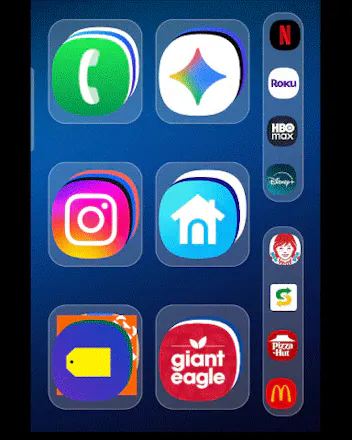
This started with a simple annoyance: I hated the clutter of individual apps on my home screen but didn't like standard folders. As my manual dexterity has changed, I also found small icons frustrating to use. I built QuickFolder to bring clarity back. It uses a fluid, Rolodex-style interface for "one-tap" access. • Dynamic Resizing: 1x1 to 3x3 layout flexibility. • Smart Sorting: Notifications jump to the top of the stack. • Fluid Navigation: Scroll through apps with a smooth motion.




Hi Product Hunt!
I’m the maker of QuickFolder. This project actually grew out of a personal frustration that I think many Android users can relate to.
The Problem:
This started from a simple annoyance: I had five different streaming apps taking up five individual slots on my home screen. I hated the clutter, but I also didn't like standard Android folders.
I built a single widget to solve that one problem, but as soon as I saw it in action, I realized I wanted them for everything: communications, social media, shopping, food, etc. The clarity it brought was addictive, and that’s how QuickFolder was born.
A Focus on Accessibility:
As my manual dexterity has progressively changed, I realized that small icons and traditional "tap-to-open" grids can be a real issue. I needed something more forgiving and accessible.
The Solution:
Instead of a grid, QuickFolder uses a stack/Rolodex-style interface. It gives you a "one-tap" access feel while only occupying a fraction of the space.
Key Features:
Dynamic Resizing: Total layout flexibility. You can resize folders from a tiny 1x1 all the way up to a huge 3x3 widget.
Smart Notification Sorting: If an app gets a notification, it automatically jumps to the top of the stack. The folder brings the priority to you so you don't have to go looking for it.
Fluid Navigation: Scroll through your apps with a smooth motion rather than hunting through the app drawer.
I’d love to hear your feedback on the navigation and how the smart sorting feels for you. I'll be here all day to answer your questions!
Thanks for checking it out!