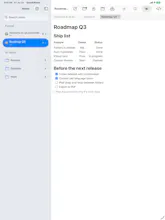
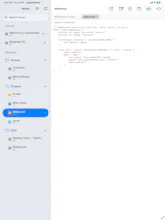
Quick notes between meetings, without the overhead. QuackNotes: notes & code snippets for macOS/iOS/iPadOS/visionOS. 🗂️ Every note is a plain file — no database, no lock-in 📝 Markdown preview 🎨 Syntax highlighting, 20+ languages ⚡️ Global shortcut for quick capture Feature requests welcome 🦆
No reviews yetBe the first to leave a review for QuackNotes
Maker
📌
Hey Product Hunt! 👋
I'm Jesus, the developer behind QuackNotes.
I built this because I kept running into the same problem: I just wanted somewhere fast to jot a thought between meetings or mid-task, and every notes app I tried felt like signing up for a whole workspace. Accounts, sync spinners, proprietary formats — way more than I needed for "quick note, back to work."
So QuackNotes is intentionally small:
🗂️ Every note is a plain text file on disk — no database, no proprietary format. Move it, grep it, sync it, back it up with whatever tool you already use.
⚡️ A global shortcut summons it over anything you're doing. Pin it on top of a meeting, capture the thought, done. It autosaves the moment you stop typing — there's no save button because there's nothing to lose.
📝 Markdown preview, editor/preview/side-by-side, re-rendered as you type.
🎨 Syntax highlighting for 20+ languages with 90+ themes, for when the "quick note" is actually a code snippet.
It's live on macOS, iOS, iPadOS, and visionOS now.
Since building it, I honestly haven't gone back to any other notes app — it's become my default for exactly the "gap between tasks" moments I built it for. I'd love for it to be useful to you too.
I'll be around all day to answer questions — and feature requests are genuinely welcome, this is very much still evolving. 🦆
Report
Being able to grep your own notes instead of exporting from some app's database is the whole pitch for me. On iOS is it still just a flat file synced through iCloud, or something else under the hood?
Report
Maker
@irahimiam We use just plain files, by default is on the documents folder within the app, but you can point any folder. Working on iCloud sync is on the roadmap.
Being able to grep your own notes instead of exporting from some app's database is the whole pitch for me. On iOS is it still just a flat file synced through iCloud, or something else under the hood?
@irahimiam We use just plain files, by default is on the documents folder within the app, but you can point any folder. Working on iCloud sync is on the roadmap.