Launching today

PulseTiles
Snap any Mac window into place, by drag, key or launcher
3 followers
Snap any Mac window into place, by drag, key or launcher
3 followers
PulseTiles snaps Mac windows into halves, thirds and quarters. Hold ⌘ and drag onto a zone, press a ⌃⌥ shortcut, or open the right ⌘ + / launcher. Save arrangements, record your keys. 7-day free trial, then $4.99 once. No accounts, no tracking.




Hey Product Hunt 👋
I’m Perlat, the one human behind FelixWeb (Felix is the dog). PulseTiles started because I had far too many windows open and kept dragging their corners around by hand, dozens of times a day.
I tried full tiling window managers, but they wanted to rearrange everything all the time. I just wanted the window I’m using to go where I point, and everything else to stay put.
So PulseTiles gives you three ways to snap:
Hold ⌘ and drag a window. The screen turns into a grid of zones; let go on one to snap. Plain drags still move freely.
⌃⌥ shortcuts for halves, quarters, thirds, maximize and center. Press ⌃⌥← again to step through ½, ⅓ and ⅔.
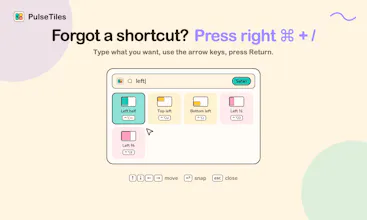
Right ⌘ + / opens a launcher. Type “left”, use the arrow keys, press Return.
A few extras for busier desks:
Arrangements: save your windows once and put them all back with one click or a shortcut.
Custom shortcuts: PulseTiles flags clashes and keys another app already uses.
Tile this display (beta): the focused window takes the left, the rest stack on the right — only when you ask.
The promise: no accounts, no tracking, no newsletter, no subscriptions. It only goes online to check for updates, and you can turn that off.
Try everything free for 7 days, no card needed. If it earns a spot in your menu bar, it’s $4.99 once. macOS 14 Sonoma or later.
I’d love to hear how you arrange your windows, and what PulseTiles should snap next.