
Pulse Island
A living island for your Mac's notch
165 followers
A living island for your Mac's notch
165 followers
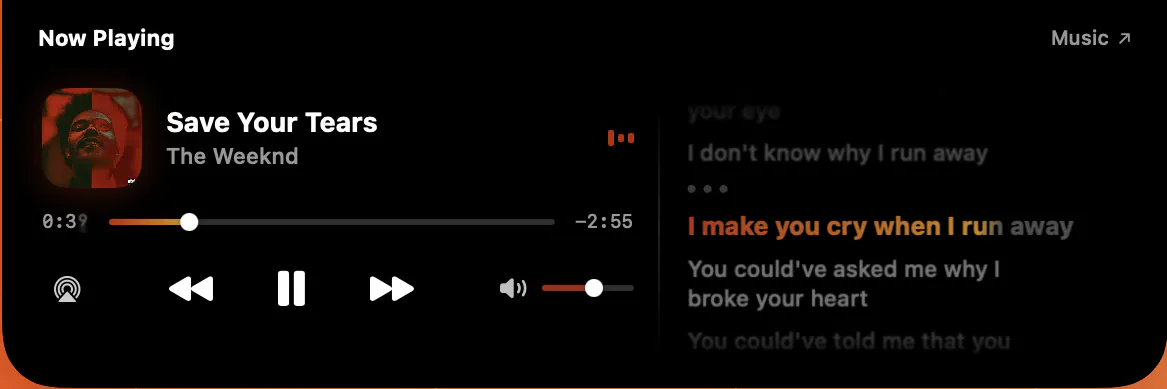
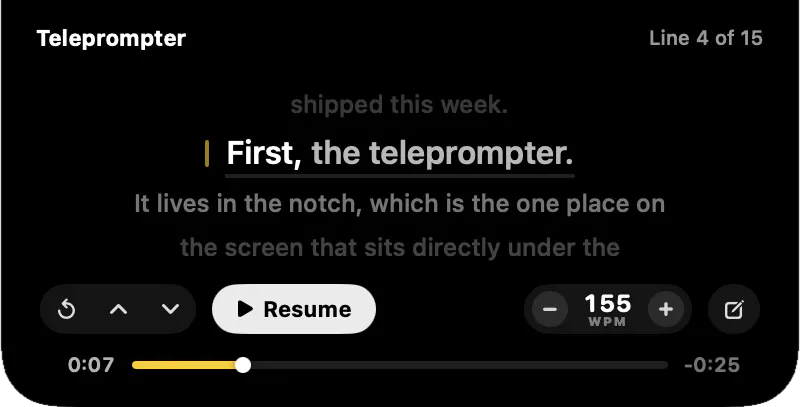
Pulse turns your MacBook's notch into a Dynamic Island: Be it music, meetings, clipboard, weather, focus timers, devices and live system stats, one glance up.


the unnotarized heads up is honest of you to call out upfront, but it's also exactly the kind of prompt that scares off non-technical users, especially for something polling the clipboard continuously in the background. is notarizing it on the roadmap, or is that waiting until after the free period ends on the 28th?
@omri_ben_shoham1 Yeah, you're right and I'd rather eat the honesty cost than have someone hit
that dialog with no warning. It's already in progress. The release script has the notarize and staple path wired up, it's the Developer ID cert I'm still getting through enrolment, so it lands in the next version update just after
the beta. Not gated on the 28th, just on Apple.
Fair point that clipboard polling raises the bar on trust, which is also why history stays in memory and never hits disk. Worth noting the ad-hoc build still has a stable code identity, so the Calendar and Bluetooth permissions you grant are remembered rather than re-prompting each launch.
@omri_ben_shoham1 Hey mate, Pulse 1.0 is Live! Give it a try here https://www.pulseisland.club
Clipboard module has been improved as well with a tons of other improvments; Do share the feedback
Open to take up feature requests as well🙌🏻
Congratulations on your launch, @aayu5hgit ! I really like the copy history functionality. On macOS, there's usually no built-in way to keep the last n copied items, so this is a really useful feature.
The UI looks great, and I like the way everything is categorised as well.
One suggestion: is there a way to customise the view? For example, it would be nice if users could choose which tabs to show or hide, or configure how many tabs are displayed in the notch.
Thank youu @shubham_tiwari43 , and yes on both counts, the lack of a system clipboard history is exactly the gap I built that card for.
You can already do most of what you're describing:
Settings > General, under the Features section, has a toggle per module, so switching one off drops its card out of the carousel entirely.
Appearance > Elements controls what shows in the collapsed notch, and the clipboard's own tab lets you set the
history size (10, 30 or 50).
What you can't do yet is reorder them, since cards are ranked by priority rather than a fixed list, so a live download outranks the weather.
@hannesh Thank you, and glad the categorisation landed, that was the part I rewrote the most.
Pomodoro isn't built yet, but it's in my plan ( you can check the website for upcoming features)
One thing I want right first: it has to be deadline based, not tick based. Decrementing on a Timer means closing the lid gives you a 25 minute pomodoro that actually took 90, since timers don't fire while the Mac sleeps. So it stores the end date and recomputes on wake.
@hannesh Thanks mate, same trick the battery and calendar cards use, and I'll ping the thread when it ships.
@hannesh Heads up here!
I'm coming with an interactive pomodoro timer feature ("Focus") in Public release on Saturday; mark your calendar!
@hannesh Pulse 1.0 is Live! Give it a try here https://www.pulseisland.club
Do share the feedback on pomodoro that excited you;
Open to take up feature requests as well
@hannesh Feedback & Feature requests are some things I prioritise more.
Have you tried beta version yet?
@mrbrjan thanks mate.
Three things Pulse adds that I don't think you get there today. Clipboard history is the big one, and it isn't a flat list, everything is typed at copy time so links, colours, images, files and code each get their own filter, and copied links have their utm tracking junk strippable in one click.
Second, device batteries, so AirPods, iPhone and Watch levels live in the notch.
Third, weather with hours ahead and four days, plus a meeting countdown with a one click join button, and a stats panel for CPU, GPU, memory, network and thermals.
I'm also building out a roadmap of things none of the notch apps do yet, so if there's a module that would actually make your day easier, tell me and we can have a discussion.
@mrbrjan Pulse 1.0 is Live! Give it a try here https://www.pulseisland.club
Do share the feedback, open to take up feature requests as well 🙌🏻
You can connect with me; I'll give you a lifetime Founder's offer to try it out