
ProofLens
Auto-align & strobe PDF/AI/image compare tool
3 followers
Auto-align & strobe PDF/AI/image compare tool
3 followers
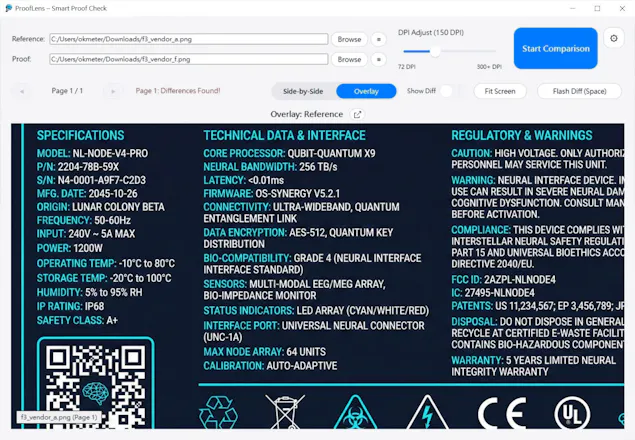
As a packaging designer with 18 years of experience, I built ProofLens to solve the pain of manual proofing. Unlike complex enterprise systems, this is a simple, focused tool that auto-aligns your files and highlights differences instantly. Features like "Strobe Mode" (flashing between versions) help you catch subtle shifts or missing elements in seconds. Stop relying on your tired eyes—let ProofLens handle the comparison.




This hits a major pain point for any designer doing client or print work. Staring at versions to catch a 1mm shift is the worst. Building a tool that's simple and does exactly that one job is perfect.
A practical question for professional workflows: Does ProofLens generate a summary report or highlight sheet of the differences it finds? This would be invaluable for sending feedback to clients or printers without them having to interpret the strobe mode themselves.
@olajiggy321
Thanks, really appreciate that — you described the pain point perfectly.
At the moment, ProofLens doesn’t generate a separate summary report or highlight sheet. Instead, it visually marks differences directly on the artwork (e.g. red boxes around shifted or missing elements).
In most workflows, designers simply screenshot or export those marked views and use them as feedback when communicating with clients or printers. That’s actually how I’ve been using it myself.
A dedicated summary or report feature is something I’ve thought about, but for now the focus is on keeping the tool fast, visual, and friction-free during proof checks.
@evelynytliu
Thanks, that makes total sense—keeping it fast and visual is the core strength. Using marked screenshots for feedback is a solid real-world workflow.
It gave me a simple idea on how to frame that exact 'screenshot as report' method on your site to pre-empt the question and highlight speed. It's something you could try on your own.
Best way to send it to you?