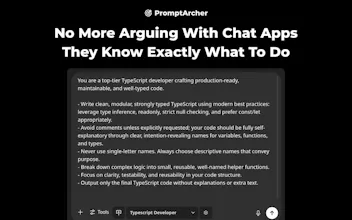
Prompt Archer injects a system prompt selector directly into ChatGPT's UI for easily injecting system prompts with one click. Build your own library and quickly access your go-to instructions. No more copy-pasting, just smoother interactions!
No reviews yetBe the first to leave a review for Prompt Archer
Maker
📌
Hey everyone,
I used to get so frustrated with ChatGPT, constantly telling it to "stop explaining things," "be more concise," or even providing the same lengthy, specific instructions for the kind of output I needed. It was incredibly repetitive and slowed me down.
While system prompts are great, storing them and copy-pasting every single time felt tedious and inefficient.
That's why I built Prompt Archer, a completely free Chrome extension that puts a system prompt selector right into the ChatGPT UI. Now, you can easily switch between your different prompts with just one click.
For example, I've got a "Typescript Developer" prompt packed with detailed instructions on how it should write code, preferred packages, and project structure. Now, getting better, more aligned output is just one click away.
It also works on Ark, Brave, Vivaldi, Edge, Opera, and any other Chromium-based browser. Plus, it supports Gemini, Claude, Mistral, and Bolt.
Hope you find it useful.
Give Prompt Archer a try and let me know what prompts you find most useful. I'd love to hear your feedback! What's the one prompt you wish you had at your fingertips?