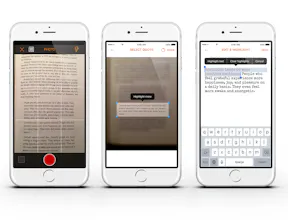
Postepic is a free to download mobile app that allows its users to capture quotes from the books they read and turn them into images with a font and a background selection thanks to the use of OCR (text recognition) technology. Users can also discover new books by browsing +3000 posts posted by the community.
No reviews yetBe the first to leave a review for Postepic 2.0
You mention that you might be targeting authors and promotion, but I see this kind of thing as being more useful in research / writing.
I've been Microsoft's free Onenote to do this - being able to capture quotes quickly from a source and then export the text contents is super useful for formulating ideas and doing research. My big problem is that a lot of the data manipulation of that is manual copy/paste.
Any chance of spinning off the capture-text bits as part of an API?
@ultimape Thanks for this comment! We started with a goal you mention and it is still our main focus as we work on some cool new features around that. But... when working on v2.0 we saw a huge potential in something similar to what you suggest. Will definitely think about it. Will it be fine to ask you for feedback if we are onto something?
Report
@konowy I can always say a few things if you want feedback, sure! I don't have an iPhone though so not sure how much help I'd be.
Hello, Product Hunters!
Thank you @bramk for hunting Postepic 2.0 and thanks to all of you for the feedback and great suggestions we received after the launch of version 1.0. It’s good to be back and show you what we’ve been working on lately.
Why did we make Postepic app?
We created Postepic because we were missing something simple that would help us to:
• capture and collect all interesting quotes from the books we were reading in one place
• discover new books by browsing quotes shared by others
What’s new?
The feedback we received was mainly about posts based on original photos of quotes from print books which did not always look presentable and could be hard to read. That is why we decided to remove adding posts based on original photos and replace them with customizable images.
How does it work?
• Take a photo with a quote from a paperback or a screenshot from your e-reading app
• OCR turns it into editable text
• You can highlight your favorite part of the quote
• Choose from 16 fonts and 26 backgrounds (including photos from the Unsplash community)
• All posts are squares with an adjustable font size to keep consistency and clean look to make sure that they look good when shared on any other social network
• Public posts end up in Postepic feed and are now also searchable by content of the quotes themselves
• They can be shared on other social networks while private posts are visible only to the user.
Product Hunt collection
We’ve prepared a collection of 600+ quotes from 100+ books hunted on Product Hunt. You can find them in the app by searching for ‘readlike producthunt’ tag. You can also preview a small excerpt of it here:
https://www.postepic.com/index.p...
I am here to answer all your questions and would love to hear what you think.
Thanks!
Lukasz
This is kinda cool, @konowy. Can we do the opposite as well: Take pictures, and easily apply our own quotes on them?
Sidenote: The typography fonts that you offer are beautiful.
@nassaraf thanks for your feedback. In this version users are limited to the background pictures included in the app, however we are considering allowing users to upload pictures in the future releases.
Report
Well done ! I like quotes - collect a lot of them - was considering making an app - what is your business model ?
Nice product guys, works really well. I've been looking for something like this for a while. A few points though that frustrated me:
1. I was forced to make an account to try to make a quote image. It would be much nicer if I could at least see how it works before handing over my email.
2. 'Public/Private' switch is unintuitive. It looks like 'Public off' but you press it (turning it to the 'on' position) and it changes to 'Private'.
3. This final point is the killer for me: I can't get a post out of the app unless I make it public. I don't want to sound too harsh but you're not going to build the next great social network. Sharing is the most important aspect of this app and limiting it to try and build your own network seems silly. I hope it's a bug or you change your mind about this aspect because otherwise it's a great product I'd love to use.
@_kjakm Great points. Thanks for your feedback!
Ad 1. Noted. We will work on moving a registration process to the last stage of quote creation (after you tap POST)
Ad 2. Agreed. We will change that.
Ad 3. I understand your point but it was not our intention and we did not even think like that.
The reason we made it is that you do not have to provide a quote source when saving it as private. We wanted to make this process faster when you save quotes for your own use, ie. you read a book and save 10, 20, 30 quotes for yourself, so you do not need to provide book author and title every time as you know what the source is :) we are working on making this step automated but it is not yet ready.
In the same time we wanted sharing option to be available only for posts with source provided out of respect to authors and to promote them.
We will consider your suggestion and will think how to implement to be in accordance with our vision,
Report
@konowy Thanks for the response and taking on the feedback. I really did like the product so hoping soon it's perfect for my usecase :) I'm guessing a source if necessary for copyright reasons or something?
@konowy I think you're onto something more than just for book quotes. I've been looking for a longggg time for a tool to turn a picture into text quick and easily, but haven't found anything nice. There are plenty of apps to turn things into just searchable documents via OCR, but still nothing that results in something copy pastable.
@nwkwan great suggestion, thanks! 🙏 We started with a goal of creating a place for sharing book quotes and discovering new books. It is still our main focus but after implementing OCR we see many ways of using it. Will think of your suggestion for sure.
Report
My slack groups are tired of me uploading quotes.
This is the game changer that I need.
Dope🚬
Postepic 2.0
Postepic 2.0
Postepic 2.0
MailKing by cloudHQ
Postepic 2.0
Postepic 2.0
Postepic 2.0
Postepic 2.0
Postepic 2.0
Pakible
Postepic 2.0
Postepic 2.0