
Post Formatter
Format LinkedIn posts with bold, italics & more
41 followers
Format LinkedIn posts with bold, italics & more
41 followers
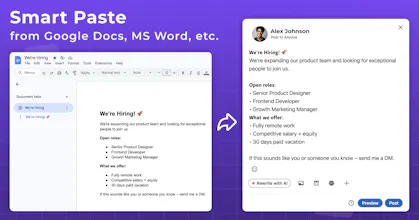
Chrome extension that adds a floating toolbar right inside LinkedIn, X, Threads, and more, plus a pop-up window to always have it at hand and a side panel for writing long-form next to any site. Select text, pick a style, done. Features 20+ Unicode font styles (bold, italic, strikethrough and more), Smart Paste from Google Docs and Word, live post preview across platforms, drafts with folders and tags, and AI proofreading & auto-styling via your own OpenRouter key.



Ah now this is interesting. I genuinely didn't even know it was possible to add formatting to LinkedIn posts. Have just tried it for myself and it worked perfectly. Have you had any feedback about whether LinkedIn would have an issue with people adding formatting? I presume they have deliberately chosen to keep text plain? That being said, I certainly plan to use it myself! Congratulations on your launch.
@martin_tanner Thanks so much for the kind words! Glad you tried and loved our tool!
LinkedIn supports a limited amount of formatting, mainly via the way you format somewhere and then paste the content (and Post Formatter helps generate it consistently). From what we’ve seen, people don’t run into issues, and it doesn’t appear to violate any “plain text only” idea or look like “hidden” markup or anything that would break the post.
We do appreciate your feedback and hope you enjoy using Post Formatter!
A keyboard shortcut to toggle the floating toolbar on and off would be huge, especially since I switch between writing and editing modes a lot. Maybe even letting users customize the shortcut themselves would make it feel much more native to their workflow.
@sozoguten62684 many thanks for the ideas! The toolbar can be switched on/off in settings, however a shortcut might also be helpful indeed!
One thing worth flagging about the Unicode approach: those bold/italic "styles" are actually separate Unicode codepoints that just visually resemble bold and italic letters, they're not semantic formatting. Screen readers often don't recognize them as normal text and either skip them, spell them out letter by letter, or garble the pronunciation. For a tool aimed at LinkedIn specifically, that's a real accessibility gap for anyone in your audience using a screen reader. Is that something you've tested against, or a known tradeoff for now?
The floating toolbar that lives inside the LinkedIn composer is honestly really well done, feels like it was designed to not get in the way. Also love that you can bring your own OpenRouter key instead of being locked into some weird credit system.
@sukruu12032 many thanks for your support! Great to know you love the idea!
I like the tool - have spend a lot of resources on LI design and not the most efficient. Is there an agentic/ autopilot version planned ?
@ashimanski Congratulations. And happy product launch.
@huisong_li Thanks! :)