Launched this week

Portlivo
Every local dev server on your Mac, in the menu bar
61 followers
Every local dev server on your Mac, in the menu bar
61 followers
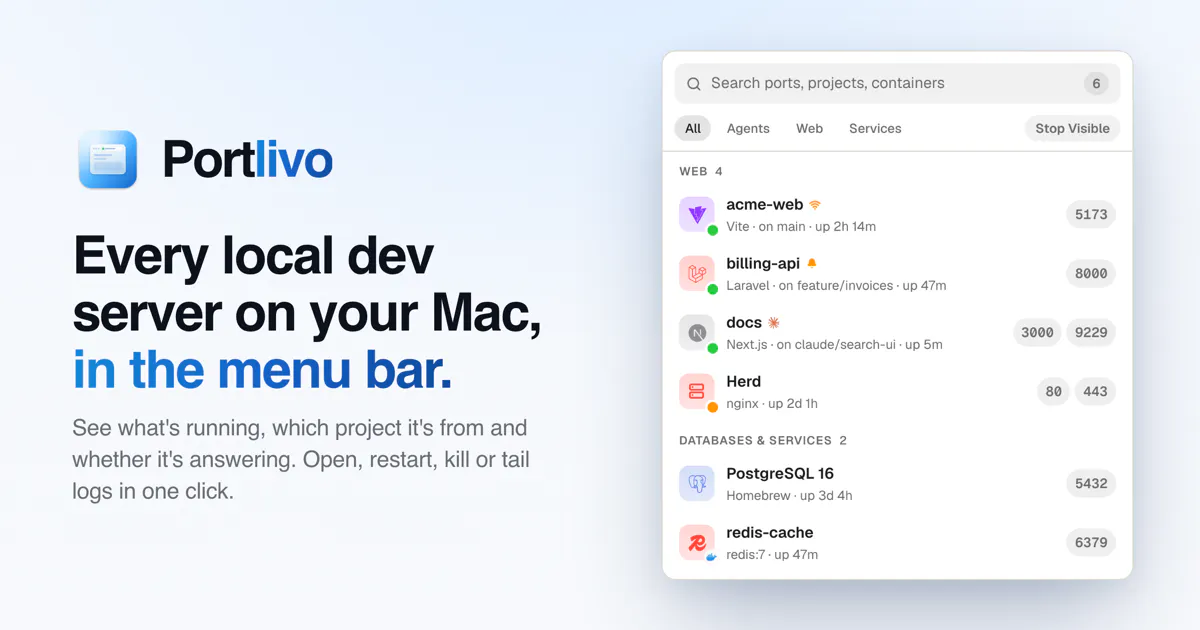
Portlivo shows every dev server and port running on your Mac: which project it's from, the command, uptime and whether it's answering. Open, restart, kill, tail logs or share any of them in one click. Native, no account, one-time price.


congrats on the launch~!!
you asked how people manage this. badly, is the answer😂 i usually have four or five up because i keep a worktree per ticket, and they're all the same repo - so the project name doesnt help me tell them apart.
does it show the path or the branch anywhere? that's the bit id need.
@seenew
Thanks so much. Same-repo worktrees are the exact case this update is for.
Portlivo 1.1 ships today. Every row shows the git repo and branch, including each worktree’s own branch, so four servers from shop read as shop · fix-login, shop · checkout-v2 and so on. The full project path is in the inspector, and clicking the branch opens that worktree in VS Code, Cursor or Zed.
1.1 also adds a live log window and a server count in the menu bar. Next up is grouping worktrees of the same repo together.
Download it now from portlivo.com and the update will come to you automatically later today. Tell me if the branch labels work for your setup.
The project name next to each port looks more useful than another list of PIDs. Nice to have logs there too, especially when several apps are running.
Thanks! @oleksii_sekundant That's exactly why I built it: "node, PID 48213" never told me which project was still running.
Logs are in the inspector: select a server and it tails its output. That works for anything started from Portlivo (including a whole stack from a project folder), docker logs for containers, and laravel.log for Laravel apps. A server you started in your own terminal tab keeps its output in that tab, so for those Portlivo shows the project, command and health, and it jumps you to the terminal or editor it came from.
What do you usually have running at the same time?
right now i just lsof -i :3000 and kill -9 whatever shows up, happens almost daily when a hot reload hangs
@jaewon_seo Same here, that was exactly my loop. Two things Portlivo changes for that case:
1. Stop sends SIGTERM, not -9, so Vite/Next get a chance to close their watchers and child workers. With kill -9 those workers sometimes outlive the parent and keep the port, which is why it can come back.
2. Restart relaunches the same command from the same project folder with the same environment, so a hung hot reload is one click instead of kill + cd + npm run dev.
What it can't do: it doesn't detect that a hot reload has hung, and if a process ignores SIGTERM, Portlivo tells you it didn't stop. kill -9 is still the right tool then.
Which stack hangs on you, Vite or Next?
"Port already in use" is a daily thing for me with a few Vite apps and a Nest backend running at once. Sharing a server to the phone by QR is the part I'd use most for mobile testing. Does it pick up servers started inside Docker too, or only native processes?
@denys_shapochkin
Both. Containers with published ports (docker run -p or ports: in Compose) show up by container name and image, not as docker-proxy, next to your native Vite and Nest processes. Restart and Stop act on the container itself, and docker logs stream into the inspector. That works with Docker Desktop and OrbStack.
One tip for the QR code: Vite only listens on localhost by default, so start it with vite --host (or server.host: true) or your phone can't reach it. Portlivo puts a network badge on servers your phone can reach, so you can see that at a glance. Nest listens on every interface by default, so it's fine as is, but have your Vite app call the API by your Mac's LAN IP rather than localhost when testing on the phone.
Happy to hear how it goes with your setup!
@anmol_sethi01 Good catch on vite --host, thanks. Checked the config and yeah, no host is set while the dev api runs on localhost:3001. A phone test would've failed right out of the gate. Regarding docker—postgres and redis live in compose for me, so mapping them by name rather than seeing docker-proxy is precisely what I needed here.
@denys_shapochkin
That localhost:3001 part is the one that usually gets people second. Once Vite listens on your network, the phone loads the page, but any fetch to localhost:3001 goes to the phone itself, not your Mac.
The easiest fix is to let Vite proxy the API, so the phone only ever talks to Vite:
Then call /api/... instead of http://localhost:3001/api/... in the app. host: true in the config also saves you typing --host every time.
On Docker: yes, compose containers show up by their container name, and Stop and Restart go through docker, so Postgres doesn't just come back. What Portlivo won't do is change your Vite config or API URL for you, that part is still yours.
Is the API on 3001 running on your Mac directly, or in compose with the databases?