
pingsrv.com
Free website monitoring & status pages — set up via DNS
3 followers
Free website monitoring & status pages — set up via DNS
3 followers
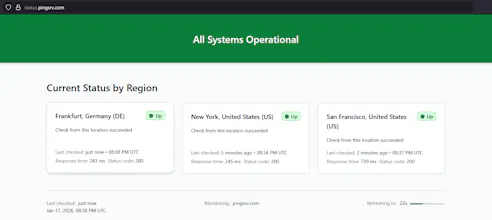
Monitor your website from 3 global locations with automatic status pages. No account needed - just add a DNS record and you're live. This is a side project built to solve my own problem. Infrastructure costs are minimal, so the core service is free. Premium features may be added later based on demand, but the basics will remain free. What you get: - Monitoring from 3 regions every 5 min - A simple status page showing recent response times and status Deactivation: simply remove the DNS record
Looks powerful, Vlad. 👏💪 interesting approach using DNS as the setup layer.
Curious to know.....when a first-time user lands....what’s the one idea you want to click before they’re willing to add a DNS record? Feels like the power shows up after that moment only.
Hi,@nishant_sharmaverick
Thanks for your comment!
You're right that the real power shows up after DNS is in place. This project is intentionally simple and free, and it's aimed at people who already have a clear need for it - so I'm not trying to push or persuade every visitor.
Before adding a DNS record, users can see concrete example of the "output" (https://status.pingsrv.com/) and understand exactly what they'll get. If the result isn't what they expected, they can simply remove the DNS entry - no harm done.
I originally built this to solve a personal need, and I'm now offering it publicly for others who have the same problem :)
@pingsrv That makes a lot of sense. The example output does most of the explaining upfront, and the DNS step acts like a natural filter for people who actually need it.
Also, I like that you’re not trying to convince everyone....more like “if this solves your problem, it’ll be obvious.” That usually leads to better users anyway.
Thanks for sharing the context behind it.
@nishant_sharmaverick no problem!!!
(unrelated... just updated the status page code with small cosmetic improvement to display response time "segments")
@pingsrv Awesome, that’s a thoughtful touch, Vlad! Visual cues like that make status pages much easier to scan at a glance.
Thanks for the update!
New update! You can now see uptime history for the last 30 days, 7 days, and 24 hours.
Downtime is counted only when it's confirmed across all monitored regions.