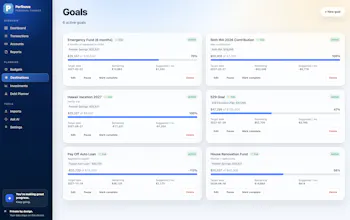
Perfinova is a privacy-first personal finance app for Mac. Track net worth, budgets, investments, retirement, and college savings while keeping your financial data entirely on your device. No bank logins. No subscriptions.
No reviews yetBe the first to leave a review for Perfinova: Personal Finance for Mac
Maker
📌
I spent years using personal finance applications that required me to hand over my bank credentials and store my financial life on someone else’s servers.
The more I thought about it, the more uncomfortable it felt.
Personal finance data is one of the most intimate maps of our lives. It reveals where we spend, what we value, what we worry about, and what goals we’re working toward.
I wanted a different approach.
So I built Perfinova, a privacy-first personal finance app for Mac. Instead of connecting to your bank, you import your own transaction files. Everything stays on your Mac. There are no accounts to create, no cloud storage, and no subscriptions.
I also wanted the software to do more than just display charts. That’s why I built an AI-powered assistant that can answer questions about budgets, spending, net worth, retirement planning, and 529 college savings planning using your own financial data.
Perfinova was built with the help of ChatGPT and Claude, making this project a fascinating collaboration between human creativity and AI assistance.
I’m excited to share it with the Product Hunt community and would love your feedback.
How do you handle importing transactions, like CSV from banks?
Report
Maker
@manal_essalek1 Absolutely. Perfinova currently supports importing transaction CSVs from banks and credit cards. It guides you through mapping columns such as date, description, and amount, previews everything before import, automatically categorizes recognized merchants, and helps prevent duplicate transactions. Your financial data remains stored locally on your Mac.
With Perfinova 2.0 (Coming soon), imports become much more powerful. We are expanding support for different bank CSV formats, improving automatic column detection and merchant categorization, adding spreadsheet-based account imports, and making it easier to review and correct transactions after importing.
Our goal is to make importing a bank statement feel straightforward, while keeping users fully in control of their data.
mailX by mailwarm
How do you handle importing transactions, like CSV from banks?
@manal_essalek1 Absolutely. Perfinova currently supports importing transaction CSVs from banks and credit cards. It guides you through mapping columns such as date, description, and amount, previews everything before import, automatically categorizes recognized merchants, and helps prevent duplicate transactions. Your financial data remains stored locally on your Mac.
With Perfinova 2.0 (Coming soon), imports become much more powerful. We are expanding support for different bank CSV formats, improving automatic column detection and merchant categorization, adding spreadsheet-based account imports, and making it easier to review and correct transactions after importing.
Our goal is to make importing a bank statement feel straightforward, while keeping users fully in control of their data.