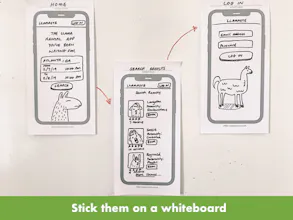
Get your ideas on paper. Pre-formatted iPhone templates make it easy to quickly test out ideas before going to Sketch. They're sticky so you can move them around on a whiteboard and visualize the user flow.
No reviews yetBe the first to leave a review for Paper Prototype
They look nice, I'd use them. Only concern is the price point for (correct me if I'm wrong) three pads of the same template? If it were something along the lines of iPhoneX, Galaxy S9, and something else (unsure of top usage statistics off the top of my head), that would make the three pads, and the cost, more appealing. I could see classroom use for UI/UX exercises, perhaps bulk options discounted for educational use should be offered. Just my two cents.
Looks good, personally indifferent from a customer standpoint, but a fan of the simple utility and design.
Pros:
Simple, effective, and serves a specific purpose.
Cons:
Price point, no device options, no purchase options/scaling/customization.
Thanks for the feedback Chris! Really like the idea of including a mixed bag of devices. Going into it, I was thinking that iPhone was the de facto device that designers consider when doing prototypes.
Totally hear your point on price. Because I produced a limited quantity to just test the idea, the initial costs were a little crazy. Now that we've got some interest, I think there's definitely an opportunity to bring those costs down.
Classroom use... interesting! Like universities? Somewhere else?
Report
Looks great but 45$ shipping cost to Germany is too much. Do you have any plans to come up with alternatives for Europe?
@philbiee thanks man, glad you like them! The concept was a "solve your own problem" situation. Actually creating the sticky notes was just a matter of finding someone local to print a small batch, testing them out, and tweaking the layout/size a little bit.
Now that they're getting more interest, I'm looking into doing a larger run!
Hello Hunters!
This may well be the most low-tech thing ever launched on Product Hunt... but hey, it does the job 🤷♂️
I like to start designs on paper. But I noticed that I was drawing a lot of rectangles to represent phone screens. That seemed kinda silly, so I found a shortcut by making sticky notes with an iPhone outline on them.
That way you can draw right on them, slap them on a whiteboard, and talk them over with your teammates. It's been nice to have a stack on my desk so I can just start sketching whenever an idea strikes.
Would love to hear what you think! I'll be around for questions. 🤙
Cheers,
Steve
Report
Great MVP! Simple and essential for rapid iteration and flow planning.
@gregw glad you think so! My favorite part is being able to just churn out a bunch of ideas and pick out the gems before investing time in Sketch or Adobe. Mapping stuff out on a board has also helped me pick out gaps in the user flow.
They look nice, I'd use them. Only concern is the price point for (correct me if I'm wrong) three pads of the same template? If it were something along the lines of iPhoneX, Galaxy S9, and something else (unsure of top usage statistics off the top of my head), that would make the three pads, and the cost, more appealing. I could see classroom use for UI/UX exercises, perhaps bulk options discounted for educational use should be offered. Just my two cents. Looks good, personally indifferent from a customer standpoint, but a fan of the simple utility and design.
Pros:Simple, effective, and serves a specific purpose.
Cons:Price point, no device options, no purchase options/scaling/customization.
Paper Prototype
GymTime
Paper Prototype
Paper Prototype
Paper Prototype
Meddler
Paper Prototype
Meddler
Product Hunt