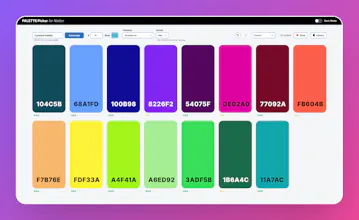
Palette Picker is a fully interactive tool designed to help you create consistent colour systems for web design, brand work or personal projects. Stop Jumping Between Tools Designing colour palettes usually means: - switching between apps - copying values manually - losing consistency Palette Picker keeps everything in one place — fast, structured, and reusable.
Available as a Windows Desktop app or Notion template.
No reviews yetBe the first to leave a review for Palette Picker for Desktop & Notion
Maker
📌
Hey everyone,
I built **Palette Picker** because I was tired of jumping between tools just to get a usable colour palette.
This is a fully interactive colour tool designed to go from idea → usable palette in seconds.
Here’s what it does:
• Instantly generate colour palettes
• Explore harmony modes (analogous, complementary, monochromatic, etc.) with up to 15 colours
• One-click copy in Hex, RGB, and HSL
• Built-in WCAG accessibility checks
• Drag to reorder colours and refine balance
• Save palettes locally (no accounts, no cloud lock-in)
• Export to CSS variables, Tailwind classes, JSON, PNG, or a UI snapshot
It’s built to support multiple workflows — whether you’re designing a site, building a UI, or putting together a brand system.
Also includes a dark mode because… obviously.
Would genuinely love your thoughts, feedback, or feature ideas.