
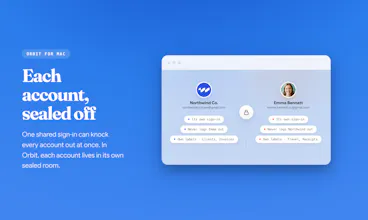
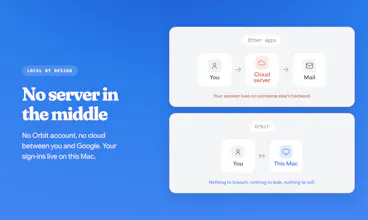
Every Google account in its own room on your Mac, fully isolated. Each one is the real Gmail web UI, with Calendar, Drive, Meet, and Gemini. No server, no subscription: pay once ($19 launch price, $89 after). Switch with ⌘1-9. Native Swift, a 12 MB app. 14-day free trial, no card needed.




What's great
fast setup (2)
I know the pain of juggling multiple Google logins every day. Switching accounts, opening the wrong inbox, and constantly checking which profile I am in gets tiring fast. Orbit for Mac solves that by keeping all my Google accounts organized in one clean place, so I can access Gmail, Drive, Calendar, Docs, Meet, and more without the usual login mess. It feels simple, fast, and made for people who manage more than one Google account.
What needs improvement
Ability to have native chrome build in with sync bookmark, ability to edit the shortcut some people may have it overlap with other apps.
vs Alternatives
This is my first time using these kind of software
Ratings
Ease of use
Reliability
Value for money
Customization
Report
41 views
What's great
fast setup (2)
Does exactly what you want it to do. I've veen using it for a couple days and have already recouped my $19 worth of time.
What needs improvement
The Maker has been great and is already pushing updates. Excited for to see where this goes. Thanks again.
vs Alternatives
I've tried a ton that didnt work the way I wanted, Orbit feels like it was built just for me.
Report
62 views
@andrewbuilds per-account notification rules!
@grace_knowhow Yes, exactly. Orbit keeps each account visually separate, with its own badge and notification mute control, so work and personal don’t blur together.
love the no-infrastructure framing, that's a rare thing to see actually followed through on rather than just marketing copy. one thing I'm curious about long term: since each account renders through system WebKit instead of a Chromium build you control, what happens when Google ships one of their periodic Gmail UI overhauls? Chromium-based tools get patched by the browser vendor on their own timeline, but WebKit compatibility with Gmail's web app specifically feels like something only you can fix, and only after it breaks for users first. is that something you're watching for or has it not been an issue yet
@galdayan Great question, and yes, this is exactly the failure mode I worry about.
Orbit does not clone Gmail or use private Gmail APIs. Each account is the real Gmail web app running in a WKWebView, using the same WebKit family Gmail already supports through Safari. So if Gmail keeps working in Safari, the main Gmail experience should keep working in Orbit too.
The parts I own are the native layer around it: account containers, switching, badges, avatar/name refresh, notification mute state, and service shortcuts. Those are designed to fail soft. If Google changes a DOM detail, Gmail still works; worst case a badge/avatar/helper gets stale until I patch it.
It has not been an issue for the core experience so far, but I do watch it. The upside of no infrastructure is that a backend change on my side cannot log everyone out at once.
Since each room is the real Gmail web UI in WebKit, what happens the day Google changes something on their end — do you have to ship an app update, or does it just keep working?
@noice30sugar Great question. The nice part of using the real Gmail web UI is that most Google-side changes keep flowing through without me rebuilding Gmail inside Orbit. The places I do have to maintain are the native edges around it: account isolation, switching, notifications, unread counts, downloads, and popups. If Google changes one of those surfaces, I patch Orbit there. But the inbox itself is still Gmail, so it is much less fragile than trying to clone Gmail with an API.
The multi-account tax is real and weirdly under-discussed. I've got a personal Google account, a project one, and a dev one, and Chrome profile-switching is where a chunk of my focus quietly leaks out every day. Two things I'm curious about: does Orbit keep each account fully sandboxed (separate cookies/sessions the way distinct Chrome profiles do), or is it more of a unified layer on top? And is it Gmail-first for now, or does it also pull Calendar/Drive per account? Clean-looking launch.
@chielephant Thank you, Anthony. Yes on both. Each account is fully sandboxed, its own cookies and session in a separate data store, the same isolation you get from distinct Chrome profiles, not a shared layer on top. And it's not Gmail-only. Calendar, Drive, Meet, and Gemini all open per account in that same isolated context, so switching accounts switches everything, not just the inbox.
@andrewbuilds I signed up for the free plan. Works as advertised. Thanks for building this. How do I pay you the $19? or does it email me an option to pay when the trial is over?
@cory_crapes Thank you, Cory, glad it's working. Since you already have the app, just open Settings and go to the License tab. There's a Buy button right there that takes you to checkout. Once you pay, the key activates it and the trial timer disappears.
@andrewbuilds Thanks, purchuse complete. Thanks again.
I currently use Kiwi but looking for something a little lighter. This looks promising!
What is the cost to get upgrades after the year is up?
Any plans to integrate Grammarly?
@nik_rivas_barnao Thanks Nik, that’s exactly why I built Orbit.
Orbit is a one-time purchase. The launch price is $19, then it moves to $89. It includes one year of updates, and you can keep using the version you bought after that.
Grammarly isn’t built in right now. Orbit is a native Mac app using WebKit, so Chrome extensions don’t run inside it. I’m going to test Grammarly for Mac with Orbit, but I don’t want to promise it until I know it works reliably.
@andrewbuilds thanks for that. So if in a few years I wanted to update it due to new features or compatibility etc.. it would be $89?
I have installed the trial and really like the overall look and feel. The notification are a lot more useful than on Kiwi.
One deal-breaker I have hit is there is a slight delay when keyboarding through or deleting/archiving messages. I generally process email very quickly, sometimes 2 emails per/sec. If the emails don't load instantly it makes this process awkward. Kiwi is instant in it's rendering but orbit has a few millisecond delay.
Is this something that can fixed or more of a platform issue?
@nik_rivas_barnao Thanks for trying the trial. Really glad the overall feel and notifications are working better for you.
For upgrades, the current purchase includes updates within the v1 line for one year, and you can keep using the version you bought after that. If there is a bigger v2 release later, that may be a separate paid upgrade, but existing customers would not be treated like brand new buyers. I’d plan to make it optional and offer a fair upgrade discount.
On the keyboard delay, that is not the experience I want. Orbit is native Swift and keeps accounts loaded, so it should feel fast once the account is warm. It may be a first-load or local machine issue, especially if it only happens right after switching accounts or waking the app.
Could you try restarting Orbit and checking whether it still happens after the inbox has fully loaded? If it keeps happening, please email me at support@orbitformac.com with your macOS version, Mac model, and when the delay happens. I’d like to look into it.
@andrewbuilds a quick bit of feedback.
The reading pane is snappier to render than when I first used it, maybe some caching/indexing needed to happen.
Grammarly is now working. Maybe it automatically integrates via the Mac app. It works better than Kiwi's integration which is a big plus. They charge $8 p/m annually to enable the plan for this.
Purchased and migrated, looking forward to see where you take this app!
The "nearly replied from my personal address" moment is the real hook here, that near-miss is universal for anyone running several accounts. One thing that'd make it a stronger buy for me: carry the account's color or identity into the compose and reply window itself, not just the app chrome. The wrong-account send happens the instant you hit send, so, the reminder needs to be right there while you're typing, not one glance away.
@syed_noor4 You just described the roadmap item I care about most. Today Orbit keeps the identity at the frame level: the account's avatar and color stay in view, and compose always opens inside that account's own room, never a shared one. But you are right that the strongest reminder belongs inside the compose window itself, right where you are typing. A per-account tint on the compose surface is doable with the same light styling layer I already use for badges, so it goes on the shortlist for the next update. This is exactly the kind of comment that decides what v1.1 looks like. Thank you, Syed.
@andrewbuilds Love that it's already on the shortlist, Andrew. One thing that might help when you build it: the single most important pixel is the send button itself, since that's the last thing your eye lands on before it's irreversible. The other spot the wrong-account slip sneaks in is reply/forward, where the account context can quietly switch mid-thread, so worth having the tint follow that too. Looking forward to v1.1.