
Onlook
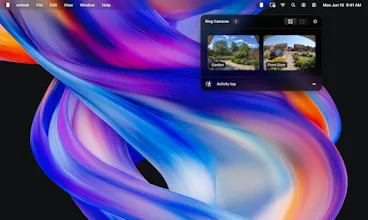
Access your Ring cameras directly from your Mac’s menu bar.
63 followers
Access your Ring cameras directly from your Mac’s menu bar.
63 followers
Bring your Ring devices to your Mac's menu bar. Live views, motion alerts, and instant replay all in one app.


Hey Product Hunt! 👋
I built Onlook because of a stupid little moment that kept repeating: I'd be deep in work at my Mac, the doorbell would go, and I'd… pick up my phone, wait for the Ring app to wake up, and miss the courier anyway. My cameras were 30cm from my keyboard the whole time.
Onlook puts your Ring cameras in the Mac menu bar. One click: live view of every camera. Click again: full view with two-way talk, so you can tell the courier to leave it by the gate without standing up. Motion and doorbell alerts arrive as native notifications — click one and you're looking at that camera. There's an activity log for replaying clips, and a little privacy lock that pixelates any camera when someone else can see your screen.
Two things I cared about while building it:
🔒 Everything runs locally. Onlook has no servers. You sign in with your own Ring account, your credentials go only to Ring, and video streams straight to your Mac. No tracking, no analytics.
🪶 It should feel like macOS. Download, drag to Applications, done — no dependencies to install. It lives quietly in the menu bar and updates itself.
Onlook is completely free, and it’ll stay that way. No subscriptions, no hidden costs — just a fast, beautiful way to view your Ring cameras right from your Mac.
Honest fine print: Onlook is an independent app, not affiliated with Ring — [and it's been through months of beta testing with real households to iron out the rough edges].
I'd love to hear what you'd want next — [multi-brand support (UniFi?) is also on the list]. Ask me anything! 🚪
@jamesm The best products often come from personal frustrations, and this is a perfect example. Beautifully built wishing you a successful launch!
@maryamjk Thanks Maryam!
@jamesm when Nest/Google Home support?
Great work on this @jamesm
Design looks exceptional as always! Would love to see this working with other cameras in future 😃
@samasante Thanks Sam, appreciate the kind words! Definitely in the pipeline.
This is awesome. Thanks @jamesm
@grantmac_ Thanks dude!
Finally a Ring app that doesn't make me dig through my phone. The menu bar motion alerts are genuinely handy while I'm working.
@samet6n40 Yes sir!
great work James, nailed every details making it such a tasteful experience! love the offline first approach
@antlio appreciate it anthony!
Can see this come in very handy, design is legit 👌
@philip_millward Thanks Philiip!
This is amazing! 🤩
@produxdesign Thank you Alexandr!