
Notebook OS
The OS layer Gemini Notebook was missing
31 followers
The OS layer Gemini Notebook was missing
31 followers
Gemini Notebook is brilliant at thinking. Everything around it is friction: copy-pasting URLs, hunting for papers in other tabs, re-typing the same instructions every session, exporting a deck with a watermark. Notebook OS removes that friction: one-click YouTube and academic sources, voice notes straight into a notebook, Skills that make it remember how you work, Studio recipes for decks, reports and quizzes, and watermark-free presenting.




Free
Launch Team

CloudflareDeploy serverless functions globally in seconds
Promoted
Hey Product Hunt 👋 I'm Hung, the maker of Notebook OS.
Gemini Notebook is one of the best thinking tools I've used, it reasons over my sources instead of the whole internet. But it's a brilliant brain with no operating system around it. Getting material in is manual. It forgets how I work. What it generates stays stuck in a tab.
Notebook OS is that operating system. One Chrome side panel, five layers:
📥 SOURCES — search YouTube and academic databases and add results as native sources. Snip any page or image. Hit record and a voice note lands in your notebook. Import a chat you had somewhere else.
🧠 SKILLS — save how you work as a reusable instruction and apply it to a notebook. It becomes a source, so Gemini Notebook keeps following it through your follow-ups, tomorrow's session, and every artifact you generate. Not a prompt you re-paste — a standing instruction. 15 built in, or write your own in two sentences.
🎛️ STUDIO — recipes that turn a notebook into audio overviews, slide decks, reports, mind maps, concept maps, flashcards and quizzes, in 50+ languages, with the right prompt written for you.
🖥️ OUTPUT — present your decks full-screen and watermark-free. Pull clean transcripts and study notes out of any video.
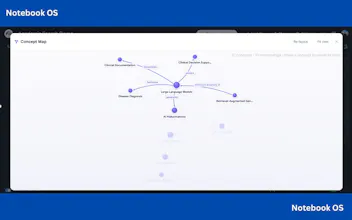
🗂️ LIBRARY — folders, tags, a visual map of every notebook, and an Artifact Shelf that pins what you make across all of them.
Each one is small on its own. Together they're the difference between a chat box and a workspace.
It's free, no credit card, and everything stays in your own Gemini Notebook account.
I'd love your honest feedback — which layer would you actually use, and what's still missing? 🙏
Building a layer on top of someone else's app means your product breaks on their release schedule, not yours. How tightly is it coupled to the DOM — and when Google ships a redesign, is that a hotfix or a rewrite? I ship a Chrome extension too and the thing I never solved is how users find out it's broken before they leave a one-star review.
I've just prepared a PDF version explaining the functions of Notebook OS. Feel free to dive deeper if you're interested: https://drive.google.com/file/d/1zph0AEoULUoOJO1p1z8fnQXc_R66WIGB/view?usp=drive_link