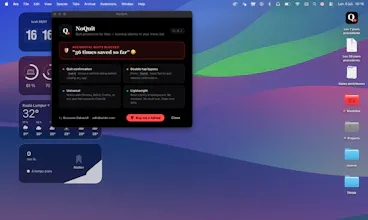
NoQuit is a tiny macOS app that protects you from accidental Cmd+Q quits. It runs quietly in your menu bar and shows a confirmation before closing any app. For power users who switched keyboard layouts or rely on shortcuts, it’s a simple way to avoid losing work to one wrong keypress.
No reviews yetBe the first to leave a review for NoQuit
Maker
📌
Hey Product Hunters 👋
I’m Oussama, the developer behind NoQuit.
I built NoQuit after switching from AZERTY to QWERTY and accidentally hitting Cmd+Q way too often. One wrong keypress and your browser or editor is gone — sometimes with unsaved work.
NoQuit runs quietly in your Mac menu bar and adds a small safety layer:
Shows a confirmation before quitting the current app
Lets power users bypass it with a Cmd+Q double-tap
Works with all apps that respond to Cmd+Q (browsers, editors, tools, etc.)
Designed to be ultra‑light on Apple Silicon
I’d love your feedback on:
Edge cases or workflows where NoQuit should behave differently
Ideas for advanced settings (per-app rules, time-based focus mode, etc.)
Any bugs you encounter on different Mac setups or keyboard layouts
If you’ve ever lost work because of a misplaced Cmd+Q, this is for you.
Thanks for checking out NoQuit and happy to answer all questions here!