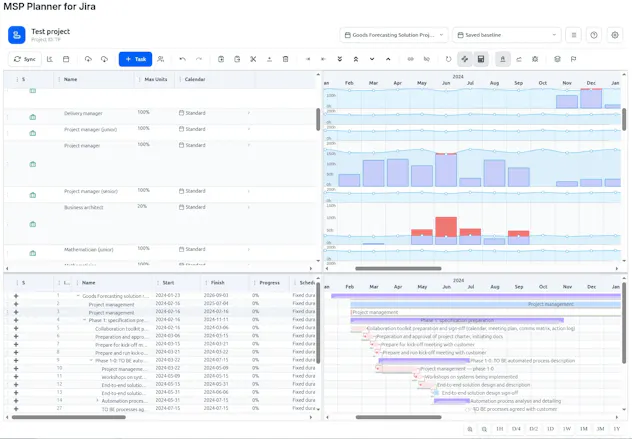
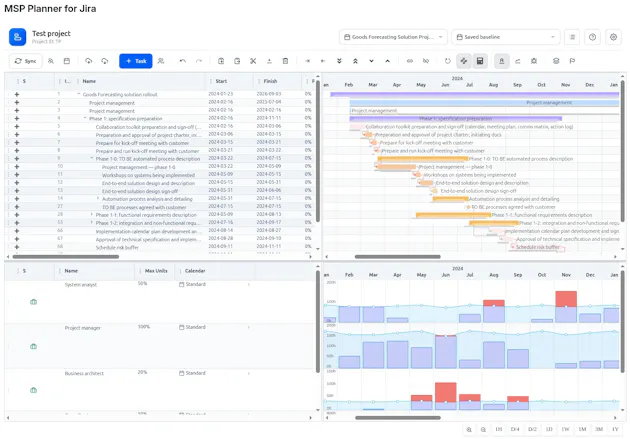
Most Jira Gantts are just visual aids. MSP Planner is a professional engine bringing deterministic scheduling, critical paths, and baselines to Jira. The game-changer? Lossless round-trip sync with MS Project— bridge the gap between agile execution and formal PMO reporting. Built on Atlassian Forge, ensuring your data never leaves the Atlassian environment. Stop the planning lie and start predictable delivery.
No reviews yetBe the first to leave a review for MSP Planner for Jira
Maker
📌
Hi Product Hunt! 👋
For over 25 years, we've worked with industry leaders to solve the most complex project management challenges. Throughout that time, we noticed a recurring tragedy: the "Planning Lie."
It happens when a Jira dashboard looks perfectly "Green" on Monday, but the project is actually drifting toward a deadline failure because the Critical Path is ignored and resources are over-allocated.
Most Jira tools just visualize dates. But for high-stakes delivery, you need a deterministic engine—something that handles complex dependencies and baselines. We also saw PMs struggling to bridge the gap between the agility of Jira and the formal requirements of the PMO, who live in MS Project.
That's why we built MSP Planner. We wanted to create a "lossless bridge" between these two worlds. No more manual data entry, no more fragmented spreadsheets, and no more "guessing" the finish date.
We built this on Atlassian Forge because we believe that professional planning shouldn't come at the cost of security. Your data stays where it belongs: in Atlassian.
We're excited to share this with you! I'd love to hear your thoughts on how you handle the tension between agile execution and formal commitments.
Let's stop the chaos together! 🚀
Report
Curious how the round-trip sync actually handles resource leveling since MS Project does that natively, does MSP Planner just pass it through or compute it on the Jira side?
Report
Maker
@toprakmdrk Yes, you certainly can level resources and pass the levelled schedule back to Jira via round-trip.
While MSP Planner doesn’t perform resource leveling natively yet — the feature is planned for future releases — the round-trip process handles it perfectly: 1. Export the schedule to MS Project (MSPDI/XML). 2. Run "Level Resources" in MS Project. 3. Import the file back into MSP Planner.
For tasks in Manual scheduling mode, the dates coming from Project are kept as-is (the schedule engine won’t move them on recalculation). After you push/sync the linked tasks, those start/finish dates are written to the corresponding Jira issues.
I'd be happy to provide further details or jump on a call for a live demo!
Report
Finally tried this on a messy Jira board and the critical path actually made sense, not just a colorful line. Round-tripping back to MS Project without losing task links saved me a whole afternoon of cleanup.
Report
Maker
@simgeyavuzcan That's a huge win! Saving a whole afternoon is a great result. We've put a lot of effort into making sure the critical path is accurate and the links stay intact during sync, so it's rewarding to hear it's paying off on a 'messy' board. If you come across any other pain points while organizing your projects, feel free to let us know - we'd love to hear your thoughts!
Report
Finally got clean baselines syncing both ways without losing fields. Critical path calc in Jira still feels surprisingly snappy on big boards.
Curious how the round-trip sync actually handles resource leveling since MS Project does that natively, does MSP Planner just pass it through or compute it on the Jira side?
@toprakmdrk Yes, you certainly can level resources and pass the levelled schedule back to Jira via round-trip.
While MSP Planner doesn’t perform resource leveling natively yet — the feature is planned for future releases — the round-trip process handles it perfectly:
1. Export the schedule to MS Project (MSPDI/XML).
2. Run "Level Resources" in MS Project.
3. Import the file back into MSP Planner.
For tasks in Manual scheduling mode, the dates coming from Project are kept as-is (the schedule engine won’t move them on recalculation). After you push/sync the linked tasks, those start/finish dates are written to the corresponding Jira issues.
I'd be happy to provide further details or jump on a call for a live demo!
Finally tried this on a messy Jira board and the critical path actually made sense, not just a colorful line. Round-tripping back to MS Project without losing task links saved me a whole afternoon of cleanup.
@simgeyavuzcan That's a huge win! Saving a whole afternoon is a great result. We've put a lot of effort into making sure the critical path is accurate and the links stay intact during sync, so it's rewarding to hear it's paying off on a 'messy' board. If you come across any other pain points while organizing your projects, feel free to let us know - we'd love to hear your thoughts!
Finally got clean baselines syncing both ways without losing fields. Critical path calc in Jira still feels surprisingly snappy on big boards.