
MosMos
Voice writing that works before, during, and after meetings
729 followers
Voice writing that works before, during, and after meetings
729 followers
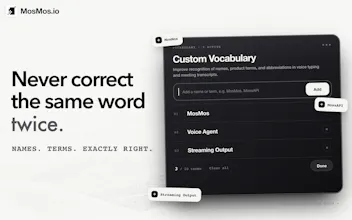
MosMos goes beyond voice dictation by turning both individual thoughts and group conversations into usable writing. Speak naturally in any app, get fast and accurate text in the style you choose, or ask MosMos to search the web for current information. Its personal glossary remembers specialized terms after you add them once. In multi-speaker meetings, it tracks precise timestamps, distinguishes speakers, and creates structured notes, summaries, decisions, and action items for easier follow-up.




Free Options
Launch Team

AWS Startup AdvisorPersonalized AWS guidance that meets you where you’re already building
Promoted


Congrats on the launch! Can the website, by default, show English first.
Or maybe detect the language based on the location or IP or something
@chilarai Thanks for flagging this! We’re already working on improving the website’s language selection so the first visit feels more natural. Appreciate the feedback and launch support 🙌
This is awesome. How many languages does it support?
@aashisengar Thanks! MosMos currently supports Chinese and English. We’re planning to add more languages with future model updates. Is there a particular language you’d like to use it in?
Congratulations on the launch! Would love to know: what other languages will you be adding in MosMos?
@pritpal_kaur Thanks! MosMos currently supports Chinese and English, with more languages planned as we update our models. We haven’t finalized which ones are next yet. Which language would you most like us to add?
i keep fixing the same product names in dictated text. A personal dictionary is pretty high on my list for that reason.
@tiantian_liu1 That exact problem is why we added it. You should only have to teach MosMos a product name once, not fix it every time.
Hi Product Hunt 👋 Lego here, technical lead at MosMos.
Building a voice-input demo is easy. Making it fast, accurate, and dependable all day is much harder.
We focused on low latency, polished output, and privacy-conscious processing. Speech recognition, personal vocabulary matching, and active-window detection run locally. MosMos uses the active app or window as a cue for polishing, and we do not retain users’ audio.
MosMos can also search the web for current information and return answers with sources.We see dictation, meetings, and tasks as one workflow—whether you’re speaking to write, think together, or capture an action.
Press Fn+Space and say, “Meeting at 3 PM.” MosMos creates a to-do and reminds you at 3. You can review tasks in Records and check them off when done.
Multi-person meetings are a core part of MosMos. It separates speakers, adds precise timestamps, and turns conversations into structured notes. You can trace any point back to the right person and moment, then create minutes, project docs, follow-up emails, or next steps without replaying the whole meeting.
Try MosMos with a niche term, unusual app, or chaotic meeting—and tell me what breaks. I’ll be here all day for technical questions.
how many speakers can it actually handle before it starts mixing people up in meetings?
@abod_rehman Great question! 2–6 people is the sweet spot from what we’ve seen. MosMos uses our in-house MOSS Transcribe Diarize Pro model. It can handle more, but similar voices background noise are usually what cause mix-ups.
@abod_rehman Curious what your usual setup looks like—how many people, and are they sharing a room or joining remotely? If you give MosMos a try, let us know where it mixes speakers up. Those examples would be really useful for improving it.
How does speaker separation hold up when people interrupt each other or briefly talk at the same time?
@carlvert We actually need our own ASR model (MOSS-Transcribe-Diarize) for speaker separation, so it has very top performance during interruptions and overlapping sentences. Welcome to try it out!
@carlvert To add a little context, our own MOSS-Transcribe-Diarize model handles transcription and speaker separation together. The goal is to keep track of who’s speaking even when the conversation gets messy.
Brief interruptions are different from several people speaking over each other for a sustained stretch. That second case is less common in the meetings we’ve seen, but it’s also harder, and speaker labels or individual words can still be wrong. If you try it with your meetings, we’d really appreciate hearing where it works well and where it needs improvement.