
MosMos
Voice writing that works before, during, and after meetings
729 followers
Voice writing that works before, during, and after meetings
729 followers
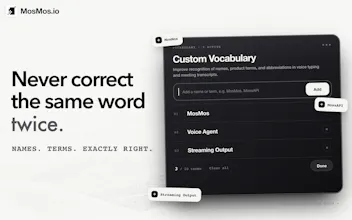
MosMos goes beyond voice dictation by turning both individual thoughts and group conversations into usable writing. Speak naturally in any app, get fast and accurate text in the style you choose, or ask MosMos to search the web for current information. Its personal glossary remembers specialized terms after you add them once. In multi-speaker meetings, it tracks precise timestamps, distinguishes speakers, and creates structured notes, summaries, decisions, and action items for easier follow-up.



Free Options
Launch Team

AWS Activate CreditsCredits that fuel your startup’s next milestone
Promoted


I understand speech recognition runs locally.
For meeting summaries and text polishing, I wonder what content is sent to external services?
@power_valsha Thanks for asking!
For text polishing, we send the text or transcript being refined, your instructions, language or formatting preferences, and the limited context needed to produce the result.
For meeting processing, this can include meeting audio and transcripts, along with the meeting title and processing instructions. Local speech recognition applies to regular dictation; meeting features can involve temporary cloud processing.
@power_valsha Thanks for asking! We offer a local ASR option for regular dictation. With local ASR selected Voice Input stays on-device. While Meeting uploads the recording for speaker-separated transcription and processes the resulting transcript in the cloud.
Hey Product Hunt,
I’m Alex, the product lead at MosMos and a full-stack developer. My day moves between product discussions, meetings, writing, and building software.
I do a lot of vibe coding, often with several coding agents running at once. Typing instructions into every window quickly becomes the bottleneck. Voice lets me explain requirements, add context, and iterate with multiple agents much faster.
That’s why we built MosMos: I could think faster than I could type.
MosMos is a native macOS voice workspace. Press Fn anywhere to speak, and it turns your thoughts into polished text. It adapts the writing style to the app you’re using and remembers personal vocabulary and technical terms.
You can also use Ask MosMos for quick questions and web searches with reviewable sources.
For meetings, MosMos records multi-person conversations and produces speaker-separated transcripts, summaries, and action items. Processing runs in the background, so you can keep working.
We’re building MosMos for product managers, developers, operators, and anyone who needs to turn conversations into documents, instructions, and next steps.
MosMos is still early, and we’d especially value feedback on:
Voice input speed and writing quality
Multi-agent coding workflows
Meeting summaries and action items
Thanks for checking out MosMos. I’ll be here throughout the launch to answer questions and learn from your feedback.
Hi, can users choose between verbatim transcription and polished writing?
@stan_xu1 Hi, Stan! Thanks for asking!
Yes, you can choose this under “Polish level” in Voice Typing.
The lowest setting gives you the original transcription without rewriting, while higher settings refine the wording and structure.
You control how much polishing is applied.
@stan_xu1 Hi Stan—just to clarify, by “verbatim,” do you mean the raw ASR transcript without AI polishing, or a strict word-for-word transcript that also preserves fillers, repetitions, and self-corrections?
Congrats on the launch ! , How many languages it's open to?
@easeops Thanks so much! MosMos currently supports Chinese and English for speech-to-text. We plan to add more languages through future model updates. Which language would you like to use?
@easeops Chinese and English are what we currently focus on for voice dictation. For meetings, our MOSS Transcribe Diarize model supports 30+ languages. Sorry for the confusion, and thanks for asking!
@1067510683 Thanks! Those little corrections add up when you’re making them every day. You can add the names and terms you use regularly once, and MosMos will use that vocabulary in both dictation and meeting notes.
@1067510683 Thanks! For us, it was internal project names and model names that kept coming out wrong. After fixing the same word a few times, personal vocabulary stops feeling like a small feature 😅
With several coding agents open, I spend a surprising amount of time typing context into each window. Being able to explain it out loud is appealing.
@romy_chou That’s a big part of why we built MosMos!
When you’re explaining a change, the background and constraints can take longer to type than the request itself. You can switch to each agent’s window and speak your instructions there.
Curious which agents you’re using together?
@romy_chou Curious, Romy: are you repeating the same background across agents, or giving each one a different brief? If you try MosMos for this, we'd love to hear where speaking saves you the most effort.
I can see myself moving between coding agent windows, dictating the next change in each one, and keeping the relevant code open while I explain.
@jackruirui Keeping the code in view while you explain the change sounds like a useful way to stay focused, Jack. Give it a try with one of your usual tasks and let us know how it compares with typing.
@jackruirui One thing worth trying, Jack: the lowest polish level keeps your wording unchanged, which can be handy for precise coding instructions. You can turn it up when you’re talking through a rough idea and want help organizing it.