
Mockraft
Unlimited bulk mockups — no credits, no Photoshop
16 followers
Unlimited bulk mockups — no credits, no Photoshop
16 followers
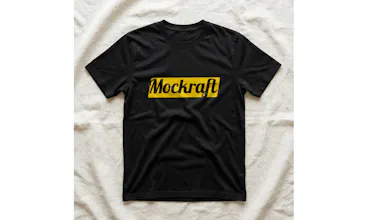
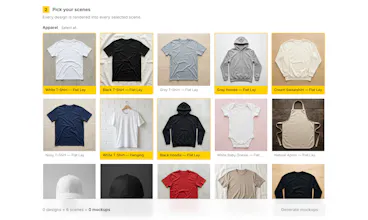
Mockraft turns a folder of print-on-demand designs into a folder of product mockups in one batch — upload up to 50 files, pick your scenes, and render every combination at once. No per-image credits, no design software, one flat monthly price.





Being able to save mockup scene presets would be a huge time saver so I can keep my favorite lighting and angle combos ready for the next batch instead of reconfiguring them every time.
@keziban37089703
Thanks — you're actually the second person to ask for scene presets today, so it's officially moving up the list.
One small clarification on how Mockraft works today: scenes are pre-shot compositions, so lighting and angle come baked into each scene rather than being knobs you configure — that's part of what keeps rendering deterministic (and the pricing flat).
So a preset would save your favorite set of scenes for one-click reuse on your next batch. If what you're really after is adjusting lighting or angle per scene, tell me more about that workflow — that's a bigger feature and I'd want to understand the need before promising anything.
One thing that would make Mockraft a no-brainer for me is the ability to save custom scene sets so I can re-render the same batch in new backgrounds later without redoing the setup. Right now if a client wants the same designs on lifestyle scenes versus studio flats, it feels like starting over.
@erol332722
Erol — you're the third person asking for scene presets today, so this is officially getting prioritized. Your case is actually the strongest argument yet for named sets (a "Lifestyle" set vs a "Studio flats" set you can switch between) rather than just remembering the last selection, which is exactly the design question I was weighing.
And you're right about the second half: today, re-rendering the same designs against a new scene set does mean starting a fresh batch.
That's a separate missing piece — a "re-run this batch with different scenes" flow — and I've filed it as its own item on the back of your comment. No date promises on launch day, but client-driven re-renders are clearly a real workflow I want to support.
honestly this looks super useful for POD sellers like me. one thing though, would be cool if you could save scene presets so I don't have to re-pick the same backgrounds every time I do a batch.
@nisa6pm9
Thanks Nisa, glad it clicks for you as a POD seller — that's exactly who it's built for. You're in good company on the presets idea: it's been the single most-requested feature today, so it's already at the top of the roadmap.
Re-picking the same backgrounds every batch is precisely the kind of friction Mockraft exists to remove, so this one's a natural fit.
Would love a way to save scene presets so I can reuse the same mockup setup across different folders without having to rebuild the scene from scratch every time.
@ardaxi50
Thanks Arda — noted, and you're not alone: saving scene setups has come up again and again today, which has pushed it straight to the top of the list. The "rebuild from scratch for every folder" pain you describe is exactly the case we want to kill: pick your scenes once, reuse them across every batch of designs. No date to promise yet, but launch-day feedback like this is what decides what ships next.
Dropped in a folder of 30 t-shirt designs, picked two scenes, and had clean mockups in under a minute. The batch rendering saved me from what would've been an entire afternoon of dragging files around in Photoshop.
@alparslanvfgl
This is the exact scenario Mockraft was built for, so thank you for testing it with a real catalog — 30 designs, two scenes, one ZIP instead of an afternoon in Photoshop. If any scene you needed was missing for your shirts, tell me which one; launch-week requests are directly shaping what gets added next.
Hey Product Hunt — maker here.
I built Mockraft after watching print-on-demand sellers burn hours (and mockup credits) turning a
design catalog into listing photos one image at a time. Most tools either meter you with credits that
run out mid-catalog, or send you to Photoshop for anything beyond a single image.
Mockraft works the other way around: upload your whole batch of designs (up to 50), pick your scenes
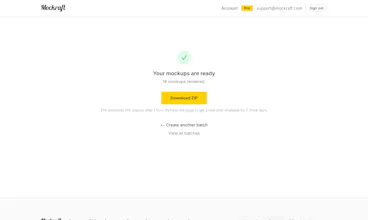
once, and it renders every design × scene combination together — then hands you the full set as one
ZIP. No credits, no design software. Pro is a flat $15/month or $99/year for unlimited full-resolution
batches, and there's a free tier so you can run the whole workflow before paying anything.
One thing I'm quietly proud of: there's no AI inference per image. Rendering is deterministic
compositing — perspective warp plus displacement mapping for fabric folds — so the 500th mockup costs
the same as the 1st. That's the only reason a flat price for unlimited batches works at all.
The scene library is at 45 scenes right now (apparel, wall art, drinkware, totes, stickers, phone
cases, and more) and growing. Feedback is genuinely useful at this stage — especially "I need scene X"
or "this broke on my catalog". I'll be here all day answering questions.
honestly this looks super useful for anyone running a POD store, the batch rendering thing is exactly what makes it interesting. one thing though, it would be really helpful if you could save your scene and background combinations as presets, so you don't have to reselect them every time you upload a new batch of designs
@seherarvs
Thanks — batch rendering is exactly the bet the whole product is built on, so glad that's what stood out.
Scene presets are a really good call. Right now scene picks reset per batch, and for sellers re-rendering a catalog on the same set of scenes that's obvious friction.
I've added it to the list — launch-week requests like this genuinely decide what gets built next.
Out of curiosity: roughly how many scenes are in your usual set? That helps me decide whether this should be one saved preset or several named ones.