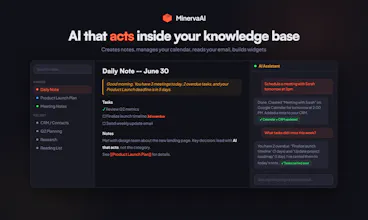
MinervaAI is a second brain where AI doesn't just answer questions β it creates and edits notes, manages your Google Calendar, reads your Gmail, builds interactive widgets, and gives you a morning briefing based on what's in your vault. The AI gets to know you the more you use it and can suggest inefficiencies in what you are doing. It can build too - dashboards, holiday trackers, fitness trackers and more
No reviews yetBe the first to leave a review for MinervaAI
Maker
π
Hey Product Hunt!
We built MinervaAI because we kept hitting the same wall: Obsidian is incredible for organizing knowledge but has no real native AI. Claude or ChatGPT remember things about you but its patchy and unfocussed.
So we set out to create an AI native knowledge base that knows you, understands what you are working on what you struggle with and improves as you use it. MinervaAI is a knowledge base where AI doesn't just chat β it acts. It creates notes from
conversation, manages your Google Calendar, reads your Gmail, builds interactive HTML widgets, can search the internet, utilise API's to create trackers and dashboards.
A few things I'm proud of:
- The AI actually does things. Ask it to schedule a meeting and it creates the calendar event. Ask it to summarize your notes and it creates a new note with the synthesis.
- BYOK model: you bring your own Claude API key. Your prompts go directly to Anthropic, never through us.
- The desktop app (69MB, built with Tauri) stores everything as local .md files that work with any markdown editor.
- 3D knowledge graph that visualises how everything connects.
- Teams collaboration with shared workspaces, activity feed, and an AI Director that summarises team activity.
- Document Workspaces β upload files, AI generates structured documents from your data.
I'll add some comments as to some of the more detailed features but If you have Obsidian, it is really easy to try us risk free as we use md files too!
The desktop app is free forever. Cloud accounts get a 14-day Pro trial so you can try calendar, email, and the background AI agent before deciding.
We'd genuinely love your feedback. What's missing? What would make this your daily
driver?
Thanks for checking it out.
Report
How does the AI handle sensitive Gmail and Calendar data privacy-wise, and does any of that information stay on your servers or get used to train models?
Report
Maker
@odilsizogl69529Β Privacy is a core design decision, not an afterthought.
Your data never trains any models. MinervaAI uses a BYOK (Bring Your Own Key) architecture β you provide your own Anthropic API key, and all AI requests go directly from our server to Anthropic using YOUR key. Anthropic's API has a zero-retention policy: data sent via API is not used for training. We don't have our own AI key and never see your conversations.
Gmail & Calendar data is never stored. When the AI reads your emails or calendar, it fetches live from Google's API,
passes the context to your AI session, and discards it immediately. No email content or calendar events are saved to
our database. Ever.
What IS stored:
- Your notes (that's the product)
- Google OAuth tokens (to maintain the connection β not your actual data)
- Your account info
Google scopes are minimal: read-only Gmail, read/write Calendar. We can't send emails, access drafts, or modify your inbox.
Desktop app stores notes as local markdown files on your machine. Cloud sync is optional.
TL;DR: We're a passthrough, not a data store. Your emails and calendar flow through temporarily and are never
persisted or used for training by anyone.
Report
Maker
@odilsizogl69529Β Also, you can use it as a knowledge base without connecting Gmail. The free trial for two weeks should give you a good idea of how it can work for you. π
Report
Curious how it handles privacy since it's reading Gmail and Calendar β is all that data staying on-device or getting processed on your servers?
- Gmail & Calendar data is never stored on our servers. When the AI reads your emails or calendar, it fetches directly from Google's API in real-time, passes the data to your AI session, and discards it. Nothing is saved to our database.
- OAuth tokens are stored securely on the server to maintain the Google connection, but your actual email content and calendar events are never persisted.
- AI processing uses your own API key (BYOK). Your notes and any Gmail/Calendar context go directly from our server to Anthropic's API using YOUR key β we never see your AI conversations or have an Anthropic key of our own.
- Desktop app keeps your notes as local markdown files on your machine, synced to cloud only if you choose to.
- Google scopes are minimal: read-only Gmail access and calendar read/write. We can't send emails or modify your inbox.
TL;DR: We're a passthrough β your data flows from Google β your AI session β Anthropic (via your key). We don't store email/calendar content and we don't have access to your AI conversations.
Report
how does it handle the privacy side of reading my gmail and calendar, does anything leave my vault or get used to train models?
- Gmail & Calendar data is never stored on our servers. When the AI reads your emails or calendar, it fetches directly from Google's API in real-time, passes the data to your AI session, and discards it. Nothing is saved to our database.
- OAuth tokens are stored securely on the server to maintain the Google connection, but your actual email content and calendar events are never persisted.
- AI processing uses your own API key (BYOK). Your notes and any Gmail/Calendar context go directly from our server to Anthropic's API using YOUR key β we never see your AI conversations or have an Anthropic key of our own.
- Desktop app keeps your notes as local markdown files on your machine, synced to cloud only if you choose to.
- Google scopes are minimal: read-only Gmail access and calendar read/write. We can't send emails or modify your inbox.
TL;DR: We're a passthrough β your data flows from Google β your AI session β Anthropic (via your key). We don't store email/calendar content and we don't have access to your AI conversations.
Report
Maker
MinervaAI Builder Story β Dubai Flight & Hotel Price Tracker π
A real example of MinervaAI as a builder, not just a note-taker. This is the story of what was asked, what was built, and why it matters
The Ask
A simple message in chat:
"I want to track flights and hotel prices for Dubai β can you set something up?"
No spreadsheets. No Zapier. No dev work. Just a conversation.
What MinervaAI Did
Rather than dumping a half-built template and walking away, MinervaAI asked the right questions β one at a time:
π« Where are you flying from?(London β Heathrow & Gatwick)
π¨ Any specific hotel?(Yes β tracked alongside flights)
β° What time should it check daily?(7am)
Then it confirmed everything before building β no surprises.
What Was Built
A fully automated daily price tracker β no code written by the user, no external tools needed.
π Three notes, created automatically:
Note
What it does
Dubai Trip -- Flight and Hotel Price Tracker
The live dashboard β updated every morning with today's prices, price history tables, trends, and top flight listings
Dubai Trip -- Booking Strategy and Price Dip Alerts
AI-generated strategy note: when to book, what price triggers to act on, historical context
Dubai Trip -- Price Alert β 2026-07-01
Daily snapshot note β captures the exact prices found that morning
π The automation runs every morning at 7am and:
Checks Google Flights for economy, business, and direct options
Checks Google Hotels for the tracked property
Compares today's price to yesterday's
Calculates the trend (rising / falling / stable)
Updates the tracker note with a running price history table
Flags significant price drops as alerts
Notes how many days until the travel date (urgency indicator)
The Conversation That Built It
User: Can you track flights to Dubai for me?
AI: I'd love to help set that up! Where are you flying from?
User: London
AI: Got it. Any preference on airport β Heathrow, Gatwick,
Stansted, or all three?
User: Heathrow and Gatwick
AI: And your travel dates?
User: 23rd December, back 2nd January
AI: How many passengers β adults and any children?
User: 2 adults, 2 kids β aged 8 and 11
AI: (Note: Google Flights counts ages 2-11 as children β
so both count as children. Confirmed: 2 adults, 2 children.)
Any specific hotel you'd like to track alongside flights?
User: Yes β [hotel name], Dubai
AI: What time should it check daily? I'd suggest 7am.
User: That works.
AI: β Here's what I'll build...
[confirms full config]
Shall I go ahead?
User: Yes
AI: Done. Your Dubai Trip tracker is live.
First prices will appear tomorrow morning at 7am.
That's it. The whole thing. No settings panel. No integrations page. Just a conversation.
Why This MattersΒ
MinervaAI isn't just a note-taker. It's a builder.
Most note apps store what you write. MinervaAI can build things for you β trackers, dashboards, automations β entirely through conversation.
"I want to track flight prices" β MinervaAI asks the right questions β builds a live tracker β runs it every morning β keeps you informed.
No Zapier. No Google Sheets. No separate app. It lives inside your knowledge base, alongside your travel notes, packing lists, and itinerary.
Other Things MinervaAI Can Build in the Same Way
Ask
What gets built
"Track crypto prices for my portfolio"
Daily price dashboard with trend arrows
"Build me a habit tracker"
Interactive HTML widget with streaks
"Set up a morning briefing"
Daily note + AI summary of your tasks, calendar, and emails
"Monitor my project tasks"
Agent that nudges you when tasks go overdue
"Build a CRM for my clients"
Linked note system with contact, deal, and activity tracking
"Summarise my team's activity this week"
Weekly digest automation with vault-wide context
The Technical Reality
Under the hood, the flight tracker uses:
SerpAPI β querying Google Flights and Google Hotels daily (free tier: 100 searches/month)
MinervaAI's automation engine β scheduled daily at a chosen UTC time
AI note generation β the AI reads yesterday's data, computes trends, writes the new dashboard entry
The user provides their own SerpAPI key (free at serpapi.com). MinervaAI stores it securely. Everything else is handled automatically.
The Bigger Picture
MinervaAI's goal isn't to be another note app. It's to be the intelligent layer on top of your life β knowing your context, building tools when you need them, and doing the work you'd otherwise forget.
The Dubai tracker is one example. But the same pattern applies to everything:
You describe what you want
MinervaAI asks the minimum questions to build it right
It builds, schedules, and runs β without you touching a config file
That's the product. That's the story.
Report
Maker
Why I Replaced Obsidian with MinervaAI π
I've used Obsidian for three years. I love it. The markdown-first philosophy, the graph view, the local-first ethos β it's the best pure note-taking app ever built.
So why did I replace it?
Because I got tired of building the tool instead of using it.
With Obsidian, I spent more time configuring plugins, debugging sync conflicts, and hunting for the right community extension than I did actually thinking. The power is real β but it comes at a cost. The cost is your time, and your cognitive overhead.
MinervaAI starts where Obsidian stops.
Same markdown. Same wiki-links. Same graph view. But then:
I type Project Roadmap and the AI already knows what's in that note β and can connect it to five other notes I forgot I'd written
I press Ctrl+D for today's daily note and it carries forward yesterday's unfinished tasks automatically, with origin dates
I say "draft a follow-up email based on my meeting notes" and it does it β then opens Gmail pre-filled
I ask "what have I been ignoring in my vault?" and it surfaces stale notes, unlinked ideas, and knowledge gaps I didn't know I had
The thing that really got me: with Obsidian, the AI is a plugin you bolt on. In MinervaAI, the AI is the app. It reads your notes, writes your notes, manages your calendar, reads your emails, builds live widgets, and remembers context across every session.
I still respect Obsidian. But I was building a second brain that needed a second job just to maintain it.
MinervaAI is what I actually wanted Obsidian to become.
If you've ever opened Obsidian and spent 20 minutes tweaking settings instead of writing β this is for you.
π Try MinervaAI free β no credit card, bring your own Claude key
Report
Maker
Weather widget built in 10 seconds - can be added to your daily note or just consult as a separate note.
How does the AI handle sensitive Gmail and Calendar data privacy-wise, and does any of that information stay on your servers or get used to train models?
@odilsizogl69529Β Privacy is a core design decision, not an afterthought.
Your data never trains any models. MinervaAI uses a BYOK (Bring Your Own Key) architecture β you provide your own Anthropic API key, and all AI requests go directly from our server to Anthropic using YOUR key. Anthropic's API has a zero-retention policy: data sent via API is not used for training. We don't have our own AI key and never see your conversations.
Gmail & Calendar data is never stored. When the AI reads your emails or calendar, it fetches live from Google's API,
passes the context to your AI session, and discards it immediately. No email content or calendar events are saved to
our database. Ever.
What IS stored:
- Your notes (that's the product)
- Google OAuth tokens (to maintain the connection β not your actual data)
- Your account info
Google scopes are minimal: read-only Gmail, read/write Calendar. We can't send emails, access drafts, or modify your inbox.
Desktop app stores notes as local markdown files on your machine. Cloud sync is optional.
TL;DR: We're a passthrough, not a data store. Your emails and calendar flow through temporarily and are never
persisted or used for training by anyone.
@odilsizogl69529Β Also, you can use it as a knowledge base without connecting Gmail. The free trial for two weeks should give you a good idea of how it can work for you. π
Curious how it handles privacy since it's reading Gmail and Calendar β is all that data staying on-device or getting processed on your servers?
@yamur9372291199Β Great question! Here's how it works:
- Gmail & Calendar data is never stored on our servers. When the AI reads your emails or calendar, it fetches directly from Google's API in real-time, passes the data to your AI session, and discards it. Nothing is saved to our database.
- OAuth tokens are stored securely on the server to maintain the Google connection, but your actual email content and calendar events are never persisted.
- AI processing uses your own API key (BYOK). Your notes and any Gmail/Calendar context go directly from our server to Anthropic's API using YOUR key β we never see your AI conversations or have an Anthropic key of our own.
- Desktop app keeps your notes as local markdown files on your machine, synced to cloud only if you choose to.
- Google scopes are minimal: read-only Gmail access and calendar read/write. We can't send emails or modify your inbox.
TL;DR: We're a passthrough β your data flows from Google β your AI session β Anthropic (via your key). We don't store email/calendar content and we don't have access to your AI conversations.
how does it handle the privacy side of reading my gmail and calendar, does anything leave my vault or get used to train models?
@nilgn6987433152Β Great question! Here's how it works:
- Gmail & Calendar data is never stored on our servers. When the AI reads your emails or calendar, it fetches directly from Google's API in real-time, passes the data to your AI session, and discards it. Nothing is saved to our database.
- OAuth tokens are stored securely on the server to maintain the Google connection, but your actual email content and calendar events are never persisted.
- AI processing uses your own API key (BYOK). Your notes and any Gmail/Calendar context go directly from our server to Anthropic's API using YOUR key β we never see your AI conversations or have an Anthropic key of our own.
- Desktop app keeps your notes as local markdown files on your machine, synced to cloud only if you choose to.
- Google scopes are minimal: read-only Gmail access and calendar read/write. We can't send emails or modify your inbox.
TL;DR: We're a passthrough β your data flows from Google β your AI session β Anthropic (via your key). We don't store email/calendar content and we don't have access to your AI conversations.
MinervaAI Builder Story β Dubai Flight & Hotel Price Tracker π
The Ask
A simple message in chat:
No spreadsheets. No Zapier. No dev work. Just a conversation.
What MinervaAI Did
Rather than dumping a half-built template and walking away, MinervaAI asked the right questions β one at a time:
π« Where are you flying from? (London β Heathrow & Gatwick)
π Where to? (Dubai β DXB)
π What are your travel dates? (Dec 23 β Jan 2)
π¨βπ©βπ§ How many passengers? (Adults + children, with ages β because Google Flights counts ages differently)
π¨ Any specific hotel? (Yes β tracked alongside flights)
β° What time should it check daily? (7am)
Then it confirmed everything before building β no surprises.
What Was Built
A fully automated daily price tracker β no code written by the user, no external tools needed.
π Three notes, created automatically:
Note
What it does
Dubai Trip -- Flight and Hotel Price Tracker
The live dashboard β updated every morning with today's prices, price history tables, trends, and top flight listings
Dubai Trip -- Booking Strategy and Price Dip Alerts
AI-generated strategy note: when to book, what price triggers to act on, historical context
Dubai Trip -- Price Alert β 2026-07-01
Daily snapshot note β captures the exact prices found that morning
π The automation runs every morning at 7am and:
Checks Google Flights for economy, business, and direct options
Checks Google Hotels for the tracked property
Compares today's price to yesterday's
Calculates the trend (rising / falling / stable)
Updates the tracker note with a running price history table
Flags significant price drops as alerts
Notes how many days until the travel date (urgency indicator)
The Conversation That Built It
That's it. The whole thing. No settings panel. No integrations page. Just a conversation.
Why This MattersΒ
MinervaAI isn't just a note-taker. It's a builder.
Most note apps store what you write. MinervaAI can build things for you β trackers, dashboards, automations β entirely through conversation.
No Zapier. No Google Sheets. No separate app. It lives inside your knowledge base, alongside your travel notes, packing lists, and itinerary.
Other Things MinervaAI Can Build in the Same Way
Ask
What gets built
"Track crypto prices for my portfolio"
Daily price dashboard with trend arrows
"Build me a habit tracker"
Interactive HTML widget with streaks
"Set up a morning briefing"
Daily note + AI summary of your tasks, calendar, and emails
"Monitor my project tasks"
Agent that nudges you when tasks go overdue
"Build a CRM for my clients"
Linked note system with contact, deal, and activity tracking
"Summarise my team's activity this week"
Weekly digest automation with vault-wide context
The Technical Reality
Under the hood, the flight tracker uses:
SerpAPI β querying Google Flights and Google Hotels daily (free tier: 100 searches/month)
MinervaAI's automation engine β scheduled daily at a chosen UTC time
AI note generation β the AI reads yesterday's data, computes trends, writes the new dashboard entry
Structured note output β price history tables, trend indicators, booking recommendations
The user provides their own SerpAPI key (free at serpapi.com). MinervaAI stores it securely. Everything else is handled automatically.
The Bigger Picture
The Dubai tracker is one example. But the same pattern applies to everything:
You describe what you want
MinervaAI asks the minimum questions to build it right
It builds, schedules, and runs β without you touching a config file
That's the product. That's the story.
Why I Replaced Obsidian with MinervaAI π
I've used Obsidian for three years. I love it. The markdown-first philosophy, the graph view, the local-first ethos β it's the best pure note-taking app ever built.
So why did I replace it?
Because I got tired of building the tool instead of using it.
With Obsidian, I spent more time configuring plugins, debugging sync conflicts, and hunting for the right community extension than I did actually thinking. The power is real β but it comes at a cost. The cost is your time, and your cognitive overhead.
MinervaAI starts where Obsidian stops.
Same markdown. Same wiki-links. Same graph view. But then:
I type Project Roadmap and the AI already knows what's in that note β and can connect it to five other notes I forgot I'd written
I press Ctrl+D for today's daily note and it carries forward yesterday's unfinished tasks automatically, with origin dates
I say "draft a follow-up email based on my meeting notes" and it does it β then opens Gmail pre-filled
I ask "what have I been ignoring in my vault?" and it surfaces stale notes, unlinked ideas, and knowledge gaps I didn't know I had
The thing that really got me: with Obsidian, the AI is a plugin you bolt on. In MinervaAI, the AI is the app. It reads your notes, writes your notes, manages your calendar, reads your emails, builds live widgets, and remembers context across every session.
I still respect Obsidian. But I was building a second brain that needed a second job just to maintain it.
MinervaAI is what I actually wanted Obsidian to become.
If you've ever opened Obsidian and spent 20 minutes tweaking settings instead of writing β this is for you.
π Try MinervaAI free β no credit card, bring your own Claude key
Weather widget built in 10 seconds - can be added to your daily note or just consult as a separate note.