
MemoryBubble
Pop Bubbles To clean your Mac's memory
52 followers
Pop Bubbles To clean your Mac's memory
52 followers
MemoryBubble is a Mac memory cleaning app that helps you monitor and clean memory in real-time with process tree and memory bubble visualization modes.


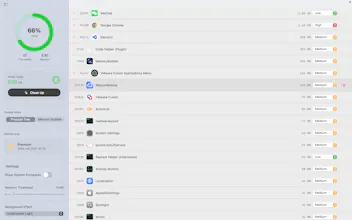


The physics mode looks fun, but I'm slightly terrified of accidentally popping a critical system kernel task. 😅 Does MemoryBubble have a safety lock or an 'ignore list' for essential macOS processes so I don't accidentally crash my system while having fun?
@yoang_loo Of course, system processes are hidden by default.
Wow, a delightful flower in the forest of ai slop. I see the graphics are heavily similar to the beautiful ui of windows aero. What inspired you to make ts? :)
🫧 Gamifying the act of force quit is brilliant. We've all had those moments where we want to physically destroy a lagging app, so 'popping' it sounds incredibly therapeutic. Does the bubble size dynamically resize in real-time as the app's memory usage spikes?
Nice app idea ! However you should enhance your website to make sure that it feels less vide-coded.
Plus I cannot manage to buy your product, when I try to purchase it the app opens a new tab in my browser, then when I go back in the app and do the same, it re-opens me a new tab, etc ... without any payment interface.
@vincentpruv Thank you for your support. You need to log in and purchase a membership on the website first, then click "upgrade" in the app. I will optimize the process in the new version. Thank you again.
@justmakeit np, it's a nice idea. The bubbles that are going behind the left-panel are a little bit frustrating tho, and in the dashboard, you should add a button or smth that linked to the pricing page directly (we feel a little bit lost, where to pay ??)
In addition, did the 5$ offer disappeared ? 😅 I'd like to buy it but 59$ for lifetime license is way too much for me.
Last but not least, sometimes bubbles get stuck to a border (right, left top or bottom), which is a usual issue with physics in a window (I experienced the same in python) so hopefully you could enhance the animation to prevent this.
Very cool product overall !
@vincentpruv Use this coupon to get only 20% of the original price. Enjoy It ;) MEMORYBUBBLEAPP
Well this is genius! Congrats on the launch
Love the concept! My only concern with visual-heavy utilities is their own footprint. The irony of running a heavy app to clean memory would be painful. 📉 Is the app built with native Swift/SwiftUI to ensure it stays lightweight, or is it web-tech based?
@yoang_loo native Swift/SwiftUI. The installation package is less than 5MB.