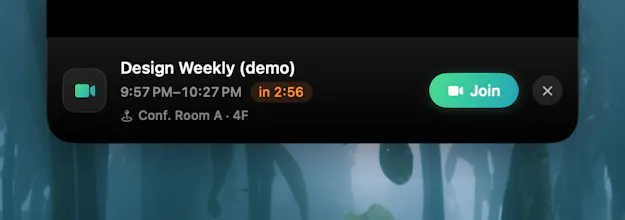
MeetIsland turns the MacBook notch into a Dynamic Island for meetings. Your next call lives quietly around the notch and expands with a live countdown and a one-click Join button (Meet/Zoom) right before it starts. Zero setup — it reads calendars already synced to macOS. $6.99 once, 14-day free trial.
No reviews yetBe the first to leave a review for MeetIsland
Maker
📌
Hi Product Hunt! 👋
I kept joining meetings 2 minutes late. Menu bar apps require glancing — and deep in work, I don't glance. Full-screen alerts felt like being yelled at.
So I built MeetIsland: your next meeting lives quietly around the MacBook notch, and right before start it expands into a Dynamic Island-style card with a live countdown and one-click Join (Meet/Zoom).
A few choices I care about: zero setup (it reads calendars macOS already syncs — no OAuth, no accounts), your calendar never leaves your Mac, it works on Macs without a notch via a virtual island, and it's a one-time $6.99 purchase — tools should be buyable, not rentable. Native Swift, the whole download is ~600 KB.
I'd love your feedback — especially: should Teams link detection come next? 🙏
Report
finally something useful for that weird notch. the countdown popping in right before a call is a nice touch and not having to grant calendar access beyond what mac already has feels right.
Report
Maker
@sevilbaykaa94u Thank you! That was the founding decision — reading through the calendars macOS already syncs means no OAuth, no accounts, no server. Your calendar never leaves your Mac, and that's permanent.
Report
Would love to see support for a small reminder chime alongside the countdown, so I don't miss the call when I'm heads-down on something. Maybe even a gentle haptic-like pulse on the trackpad for the final 10 seconds.
Report
Maker
@cemdokurel Love this idea — a soft chime plus a subtle haptic pulse in the final 10 seconds fits exactly how MeetIsland is meant to feel: peripheral, not intrusive. Adding both to the shortlist as opt-in toggles. One honest caveat on haptics: the Force Touch trackpad can do it (NSHapticFeedbackManager), but you'd only feel it while touching the trackpad — so the chime will likely land first, haptics as an opt-in experiment after. Quick question back: would you want the chime every time, or only when you're in a full-screen app and might miss the island?
the local-only, no-OAuth calendar reading is a good call given how much other meeting software wants full calendar API access for something this small. curious about a setup that's common for a lot of desk work though - if the laptop lid is closed and you're on an external monitor, does the island/countdown show up somewhere on the external display, or is this tied specifically to the built-in screen (real or virtual notch)?
Report
the notch finally does something useful. countdown showed up about two minutes before my call and the join button actually opened the right meet link, which is more than i expected for a tiny little pill.
Report
love how it just reads whatever calendar is already synced to macos, no fiddling with permissions or weird config. the one-click join button tucked into the notch is such a clean little move, honestly feels native instead of bolted on
Report
Cute idea, love that it just works with the calendars I already have. One thing though, would be great if it could show a tiny preview of who's joining or the meeting topic right in the island. Right now I still have to click through to figure out if it's a quick sync or a real one I need to prep for.
finally something useful for that weird notch. the countdown popping in right before a call is a nice touch and not having to grant calendar access beyond what mac already has feels right.
@sevilbaykaa94u Thank you! That was the founding decision — reading through the calendars macOS already syncs means no OAuth, no accounts, no server. Your calendar never leaves your Mac, and that's permanent.
Would love to see support for a small reminder chime alongside the countdown, so I don't miss the call when I'm heads-down on something. Maybe even a gentle haptic-like pulse on the trackpad for the final 10 seconds.
@cemdokurel Love this idea — a soft chime plus a subtle haptic pulse in the final 10 seconds fits exactly how MeetIsland is meant to feel: peripheral, not intrusive. Adding both to the shortlist as opt-in toggles. One honest caveat on haptics: the Force Touch trackpad can do it (NSHapticFeedbackManager), but you'd only feel it while touching the trackpad — so the chime will likely land first, haptics as an opt-in experiment after. Quick question back: would you want the chime every time, or only when you're in a full-screen app and might miss the island?
Dial
the local-only, no-OAuth calendar reading is a good call given how much other meeting software wants full calendar API access for something this small. curious about a setup that's common for a lot of desk work though - if the laptop lid is closed and you're on an external monitor, does the island/countdown show up somewhere on the external display, or is this tied specifically to the built-in screen (real or virtual notch)?
the notch finally does something useful. countdown showed up about two minutes before my call and the join button actually opened the right meet link, which is more than i expected for a tiny little pill.
love how it just reads whatever calendar is already synced to macos, no fiddling with permissions or weird config. the one-click join button tucked into the notch is such a clean little move, honestly feels native instead of bolted on
Cute idea, love that it just works with the calendars I already have. One thing though, would be great if it could show a tiny preview of who's joining or the meeting topic right in the island. Right now I still have to click through to figure out if it's a quick sync or a real one I need to prep for.