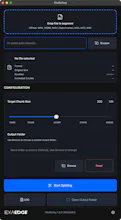
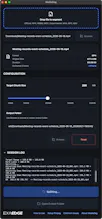
MediaSeg is a local macOS utility that splits large media files into upload-ready chunks for practical, size-limited workflows. It is useful for NotebookLM-style uploads and similar destinations, and now officially supports MP4, WEBM, and MOV, with M4A, MP3, and WAV available as experimental support. Recent updates also added theme and language support.
MediaSeg is a local macOS utility that splits large media files into upload-ready chunks while preserving quality.
It was produced and directed with full AI assistance, and shipped in 2 days from idea to public release.
Feedback welcome on workflow clarity, screenshots, and positioning.
Report
@sho_nishikawa_exaedge Hey, are you planning a mode that splits on keyframes as well as target size?
@romejerome Not in v1. I’m keeping the size-based stream-copy approach for now to keep the workflow simple, but keyframe-aware splitting is definitely worth considering later.
Report
@sho_nishikawa_exaedge Ya,no sweat. It's not a must have for now. Congrats on the launch
Hey @sho_nishikawa_exaedge congrats on the launch! Genuine question, how are you handling user questions right now, and has that been a pain yet or not really? Just trying to learn what's real this early. No worries if you're heads-down.
This solves a real workflow annoyance. Zoom recordings and long interview clips are exactly the kind of files that break upload limits constantly, and the existing options are either clunky web tools or rolling your own ffmpeg commands. The macOS-native angle is smart - nobody wants a browser tab for this. Shipped in 2 days from idea is impressive too. What's the largest file you've tested it on, and does it handle multi-track audio correctly after splitting?
@galdayan The largest file we’ve tested so far is a 7.7GB MP4. I haven’t run a dedicated multi-track audio sample yet, so that’s the next thing I want to verify.
Report
stream-copy by size is the honest call — but when a cut lands mid-GOP, the next chunk opens with no i-frame, so anything that re-decodes per chunk (notebooklm) eats garbage till the next keyframe. snapping the boundary to the nearest keyframe is the usual escape hatch.
@qifengzheng Yes — if a downstream system decodes each chunk independently, boundary artifacts can matter. MediaSeg is an upload-prep tool rather than a frame-accurate editor, so it keeps the current size-based stream-copy approach.
Report
@sho_nishikawa_exaedge fair — for upload-prep the simplicity wins. only wrinkle is notebooklm does re-decode per chunk for transcription, so the first second after each cut can slur a few words. acceptable tax vs keyframe-index bookkeeping though — right call for v1.
@qifengzheng That makes sense. For now, v1 keeps the size-based stream-copy approach because I want to keep the workflow simple, but keyframe-aware splitting is definitely a useful follow-up to consider.
Report
Local-first is the right default for long recordings. One positioning detail I would make very explicit: whether the split path uses stream copy vs re-encode. "Preserving quality" lands harder when people know the media is not being touched unnecessarily.
@krekeltronics Agreed. MediaSeg keeps the split path local and uses ffmpeg stream copy, so MP4 files are not re-encoded during splitting. WEBM inputs are converted to MP4 first, then split.
Report
How big is the largest file you’ve run through? I’m curious where the limit is, with NotebookLM recordings I once struggled with 4GB files and the standard tools were crying.
@elias_motionfy For the NotebookLM-style workflow, we’re targeting 100MB–200MB chunks. The largest source file we’ve tested so far is a 7.7GB MP4, which is already in the range of the long-form recordings people keep running into upload limits with.
Report
@sho_nishikawa_exaedge 7.7GB is mostly the range where many tools start breaking, audio sync goes off the moment ffmpeg chunks it manually.
As a music producer I hit this constantly with long mixdowns and stem bounces that blow past upload caps — does it handle audio-only files (WAV/AIFF) too, or is it video-first for now? Local + ffmpeg stream copy is exactly the right call.
@lennoxbeflying Audio-only support is not in the current release; the app is video-first for now. Current supported inputs are MP4 and WEBM, and audio-only formats are on the roadmap.




MediaSeg
@sho_nishikawa_exaedge Hey, are you planning a mode that splits on keyframes as well as target size?
MediaSeg
@romejerome Not in v1. I’m keeping the size-based stream-copy approach for now to keep the workflow simple, but keyframe-aware splitting is definitely worth considering later.
@sho_nishikawa_exaedge Ya,no sweat. It's not a must have for now. Congrats on the launch
MediaSeg
@romejerome thank you!
Hey @sho_nishikawa_exaedge congrats on the launch! Genuine question, how are you handling user questions right now, and has that been a pain yet or not really? Just trying to learn what's real this early. No worries if you're heads-down.
MediaSeg
@moijam Appreciate it. Still pretty lightweight for now — we’re handling questions directly and keeping feedback close while usage is small.
Dial
This solves a real workflow annoyance. Zoom recordings and long interview clips are exactly the kind of files that break upload limits constantly, and the existing options are either clunky web tools or rolling your own ffmpeg commands. The macOS-native angle is smart - nobody wants a browser tab for this. Shipped in 2 days from idea is impressive too. What's the largest file you've tested it on, and does it handle multi-track audio correctly after splitting?
MediaSeg
@galdayan The largest file we’ve tested so far is a 7.7GB MP4. I haven’t run a dedicated multi-track audio sample yet, so that’s the next thing I want to verify.
stream-copy by size is the honest call — but when a cut lands mid-GOP, the next chunk opens with no i-frame, so anything that re-decodes per chunk (notebooklm) eats garbage till the next keyframe. snapping the boundary to the nearest keyframe is the usual escape hatch.
MediaSeg
@qifengzheng Yes — if a downstream system decodes each chunk independently, boundary artifacts can matter. MediaSeg is an upload-prep tool rather than a frame-accurate editor, so it keeps the current size-based stream-copy approach.
@sho_nishikawa_exaedge fair — for upload-prep the simplicity wins. only wrinkle is notebooklm does re-decode per chunk for transcription, so the first second after each cut can slur a few words. acceptable tax vs keyframe-index bookkeeping though — right call for v1.
MediaSeg
@qifengzheng That makes sense. For now, v1 keeps the size-based stream-copy approach because I want to keep the workflow simple, but keyframe-aware splitting is definitely a useful follow-up to consider.
Local-first is the right default for long recordings. One positioning detail I would make very explicit: whether the split path uses stream copy vs re-encode. "Preserving quality" lands harder when people know the media is not being touched unnecessarily.
MediaSeg
@krekeltronics Agreed. MediaSeg keeps the split path local and uses ffmpeg stream copy, so MP4 files are not re-encoded during splitting. WEBM inputs are converted to MP4 first, then split.
How big is the largest file you’ve run through? I’m curious where the limit is, with NotebookLM recordings I once struggled with 4GB files and the standard tools were crying.
MediaSeg
@elias_motionfy For the NotebookLM-style workflow, we’re targeting 100MB–200MB chunks. The largest source file we’ve tested so far is a 7.7GB MP4, which is already in the range of the long-form recordings people keep running into upload limits with.
@sho_nishikawa_exaedge 7.7GB is mostly the range where many tools start breaking, audio sync goes off the moment ffmpeg chunks it manually.
Good luck with the launch.
MediaSeg
@elias_motionfy thank you!
As a music producer I hit this constantly with long mixdowns and stem bounces that blow past upload caps — does it handle audio-only files (WAV/AIFF) too, or is it video-first for now? Local + ffmpeg stream copy is exactly the right call.
MediaSeg
@lennoxbeflying Audio-only support is not in the current release; the app is video-first for now. Current supported inputs are MP4 and WEBM, and audio-only formats are on the roadmap.
Mailwarm
Does it split on keyframes to avoid glitches, or is it strictly by file size?
MediaSeg
@thamibenjelloun MediaSeg currently splits by target size using ffmpeg stream copy, not by explicit keyframe alignment.
It keeps the workflow simple and local, while still aiming for clean upload-ready chunks.