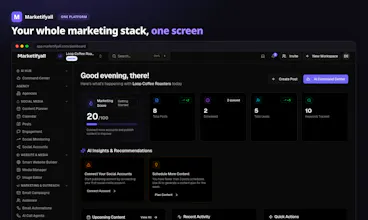
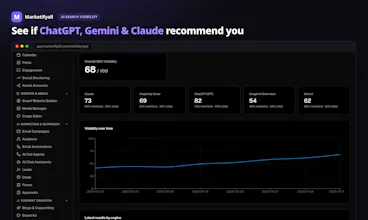
Marketifyall is the all-in-one AI marketing platform — CRM, social, email, content, websites and funnels, plus real SEO and AI-search (GEO) visibility, in one login. A modern GoHighLevel alternative with transparent pricing, per-workspace branding for agencies, and an AI agent that runs the busywork.
No reviews yetBe the first to leave a review for Marketifyall
Maker
📌
Hey Product Hunt 👋 I'm Aadil.
I built Marketifyall because I was tired of watching agencies duct-tape Semrush, a rank tracker, a social scheduler, an email tool, and GoHighLevel together—only to still have zero clue if their clients actually show up when someone asks ChatGPT for a recommendation.
It's an all-in-one marketing platform built specifically for content and SEO-led teams. Here is what you can do from one dashboard:
🤖 Track GEO (Generative Engine Optimization): See if your brand is mentioned in ChatGPT, Perplexity, Gemini, Claude, & Google AI Overviews. (The metric everyone is scrambling to measure right now).
🔎 Real SEO, Not Just Checklists: Track rankings, Core Web Vitals, and sync directly with Google Search Console.
📅 Social & Content Pipeline: Generate blogs/landing pages with AI and schedule them across your channels.
🌐 1-Click Sites: Build and publish a functional site instantly.
🧠 AI Command Center (with MCP): We have a native MCP server so you can point your own custom AI agent straight at your marketing stack.
Two things I care about most as an independent developer:
1. Pricing you can actually read.
Two meters: workspaces + bundled AI credits. No per-send email fees, no per-SMS surcharges, and no hidden AI interaction traps. There is a free plan (no card required) to test the waters, and it’s a flat $29/workspace when you're ready to scale.
2. Complete honesty about what is built.
I'm shipping this in the open. A few things (SMS sending, full white-labeling, reselling) are on the roadmap and labeled as such. I would rather under-promise and over-deliver than sell you vaporware.
I would love your feedback, especially from agencies and SEOs: What's the one marketing tool you wish you could completely delete from your stack today?
I'll be hanging out in the comments all day to answer questions, talk technicals, and take feature requests! 🙏
Report
The per-workspace branding for agencies is a really smart touch, makes white-labeling feel native instead of bolted on. Curious how the AI agent handles the busywork across channels without stepping on each other.
Report
Maker
@eymam0zm Thank you Şeyma! And you picked up on something real, the branding lives at the workspace level instead of being a skin on top, which is why it feels native. Full white-labeling and reselling are still on the roadmap though, I want to be upfront about that. What's there today is per-workspace branding to keep client environments clean.
On the channels question, the honest answer is that it's boring by design. The agent doesn't run separate bots per channel that could collide. It takes your goal, builds one small plan, and works through the tasks in order, so the social drafts, email campaign and SMS drafts come out of the same plan with shared context instead of five agents improvising in parallel. Everything is scoped to one workspace too, so nothing bleeds across clients.
And anything that actually ships to a channel waits for your approval first, so even in theory two actions can't race each other out the door.
"Boring by design" was a deliberate choice after watching multi-agent setups produce chaos. Curious if that matches what you'd want, or if you'd actually prefer more autonomy across channels?
Report
finally gave it a spin and the per-workspace branding is genuinely useful for keeping client logins clean. the AI agent handling follow-ups felt less gimmicky than expected.
Report
Maker
Thanks @hayrettine73960 , glad it clicked! Keeping client logins clean was honestly half the reason workspaces work the way they do. Nobody wants to explain to a client why their dashboard has someone else's branding on it.
And "less gimmicky than expected" might be my favorite compliment so far. The bar for AI agents is on the floor right now, so the goal was just to make it quietly useful instead of flashy.
Report
how does the AI agent actually handle the busywork in practice, like does it just draft stuff for review or can it publish and send on its own?
Report
Maker
Hey @edasayakaldf Short answer: it drafts on its own, it never ships on its own.
The way it works in practice: you give it a goal, it breaks that into a small plan and runs the safe stuff freely. Pulling reports, generating post drafts, writing email and SMS campaigns, building keyword lists. All of that lands as drafts in your workspace.
The moment a plan hits anything irreversible, like actually publishing a post or sending a campaign, it stops and asks. That's not a setting you can forget to turn on, the executor literally refuses to run an unapproved publish step or anything after it. Once you approve, it takes care of the rest, including posting at the scheduled time.
Same rule applies if you hook up your own AI agent through our MCP server. It gets the same tools, and irreversible actions come back with an approval link instead of just happening.
So "runs the busywork" means it does the drafting, planning and reporting grind, and you stay the only one with publish rights. Would love to hear what you'd want it to take off your plate!
Report
finally tried it after putting it off and the all-in-one setup actually feels cohesive, not stitched together. the per-workspace branding for agencies is a nice touch i wasn't expecting.
Report
Maker
@selim321016 Thanks Selim, this made my day honestly. "Cohesive, not stitched together" is exactly what I was going for. Most all-in-ones are basically five acquisitions in a trenchcoat, so I built everything on the same data layer from the start.
And glad the workspace branding was a nice surprise. That one came from talking to agency folks who were sick of paying white-label surcharges just to slap a client logo on a dashboard.
Since you've actually poked around, did anything feel missing or rough? I'm collecting feature requests from real usage right now so anything you noticed helps.
The per-workspace branding for agencies is a really smart touch, makes white-labeling feel native instead of bolted on. Curious how the AI agent handles the busywork across channels without stepping on each other.
@eymam0zm
Thank you Şeyma! And you picked up on something real, the branding lives at the workspace level instead of being a skin on top, which is why it feels native. Full white-labeling and reselling are still on the roadmap though, I want to be upfront about that. What's there today is per-workspace branding to keep client environments clean.
On the channels question, the honest answer is that it's boring by design. The agent doesn't run separate bots per channel that could collide. It takes your goal, builds one small plan, and works through the tasks in order, so the social drafts, email campaign and SMS drafts come out of the same plan with shared context instead of five agents improvising in parallel. Everything is scoped to one workspace too, so nothing bleeds across clients.
And anything that actually ships to a channel waits for your approval first, so even in theory two actions can't race each other out the door.
"Boring by design" was a deliberate choice after watching multi-agent setups produce chaos. Curious if that matches what you'd want, or if you'd actually prefer more autonomy across channels?
finally gave it a spin and the per-workspace branding is genuinely useful for keeping client logins clean. the AI agent handling follow-ups felt less gimmicky than expected.
Thanks @hayrettine73960 , glad it clicked! Keeping client logins clean was honestly half the reason workspaces work the way they do. Nobody wants to explain to a client why their dashboard has someone else's branding on it.
And "less gimmicky than expected" might be my favorite compliment so far. The bar for AI agents is on the floor right now, so the goal was just to make it quietly useful instead of flashy.
how does the AI agent actually handle the busywork in practice, like does it just draft stuff for review or can it publish and send on its own?
Hey @edasayakaldf Short answer: it drafts on its own, it never ships on its own.
The way it works in practice: you give it a goal, it breaks that into a small plan and runs the safe stuff freely. Pulling reports, generating post drafts, writing email and SMS campaigns, building keyword lists. All of that lands as drafts in your workspace.
The moment a plan hits anything irreversible, like actually publishing a post or sending a campaign, it stops and asks. That's not a setting you can forget to turn on, the executor literally refuses to run an unapproved publish step or anything after it. Once you approve, it takes care of the rest, including posting at the scheduled time.
Same rule applies if you hook up your own AI agent through our MCP server. It gets the same tools, and irreversible actions come back with an approval link instead of just happening.
So "runs the busywork" means it does the drafting, planning and reporting grind, and you stay the only one with publish rights. Would love to hear what you'd want it to take off your plate!
finally tried it after putting it off and the all-in-one setup actually feels cohesive, not stitched together. the per-workspace branding for agencies is a nice touch i wasn't expecting.
@selim321016 Thanks Selim, this made my day honestly. "Cohesive, not stitched together" is exactly what I was going for. Most all-in-ones are basically five acquisitions in a trenchcoat, so I built everything on the same data layer from the start.
And glad the workspace branding was a nice surprise. That one came from talking to agency folks who were sick of paying white-label surcharges just to slap a client logo on a dashboard.
Since you've actually poked around, did anything feel missing or rough? I'm collecting feature requests from real usage right now so anything you noticed helps.