
Lunen.ai
Build AI agents your whole team can run, and control
140 followers
Build AI agents your whole team can run, and control
140 followers
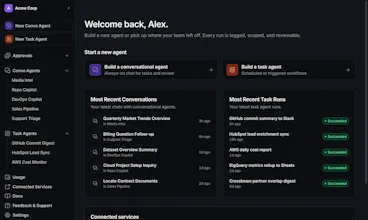
You've used ChatGPT and Claude for real work. They just do the task. No record of what they touched, no approval on the risky step, nothing you could hand your security team. Great UX, zero governance. Enterprise tools flip it: total control, an interface nobody wants to open. Lunen is what automated AI should be, the clean UX and the full transparency, not one or the other. Now in early access.



Payment Required
Launch Team / Built With


CheckoDetect AI Generated Images & Deepfakes for Free
Promoted
One thing that would help my team a lot is a side-by-side replay viewer that shows what the agent did step by step with diffs, so I can review an overnight run in a few minutes instead of digging through logs. That kind of timeline with redo and undo per step would make the whole governance story actually usable day to day.
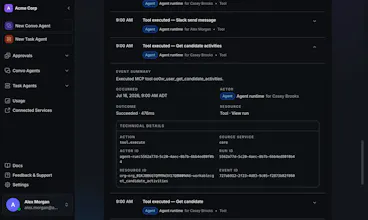
@cafermqyf thanks for the comment! You can fully see the session as it played out in our UI in an exact timeline view, but we haven't figured out redo/undo at the step level yet. That's a very cool thought!
Having built self-hosted MCP agents, governance is always the bottleneck: defining unattended vs. human-in-the-loop actions and auditing the aftermath. You can ignore this solo, but it kills enterprise adoption.
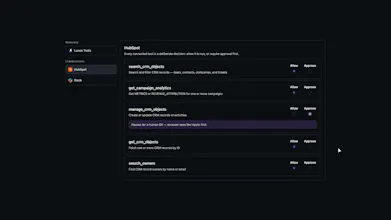
The "allow reads, approve writes" approach with unified audit logs targets this perfectly, though I'm curious if it survives a real security review.
For anyone running agents in production: where do you draw the line for human intervention? That’s the boundary I find hardest to define.
I've had access to Lunen for a few weeks and have an agent that runs daily that is saving me hours of work per week, and will only continue to get better as I refine and have an agent that can build these agents for me.
Finally got access this week and the activity log is the standout for me, I can actually see every file and step it took without digging through chat scrollback. The approval prompt for risky actions feels like the right amount of friction too.
Finally tried it this morning and the approval log before risky steps actually feels useful, not just busywork. The fact that I can see exactly what the agent touched makes me way more comfortable letting it loose on real files.
Finally something that doesn't make me choose between a nice interface and actual visibility. Tried a small workflow and the audit trail was already there without me digging for it.
@Mike Rudolph that policy layer approach makes sense, per-org control instead of a hardcoded default is the right call given how differently teams weigh risk. does the approval step block the agent mid-run until a human clicks approve, or does it queue the action and let the agent keep working on other parts of the task while it waits?