
LightTwist
Record & stream your show in a realistic virtual studio
139 followers
Record & stream your show in a realistic virtual studio
139 followers
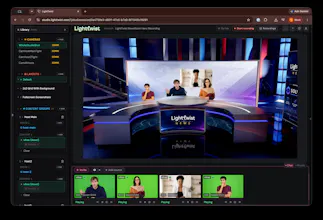
LightTwist lets you record & stream in a realistic virtual studio, even if your guests and co-hosts are remote. LightTwist is a virtual video studio that runs in Chrome, with a backend virtual production platform utilizing realtime computer vision for background removal and compositing, Unreal Engine 5 for rendering, and WebRTC for A/V streaming. It runs in realtime so you can live stream or record "live to tape", with a live preview so you see exactly what's getting streamed or recorded.




How well does the realtime compositing hold up with more than four remote guests on screen at once? Curious if performance dips or if it scales cleanly with Unreal doing the heavy lifting in the browser.
LightTwist
@caner334669 Most of the processing for participant streams happens in separate computer vision servers, so the Unreal rendering server doesn't have much extra work when compositing these extra streams. The browser in the client doesn't do much work, it mostly handles the video call! 4-5 remote guests works just fine!
How does the background removal hold up with messy or uneven lighting in a home office setup? Curious if it needs a green screen or if regular webcam footage actually looks clean enough for a professional-looking stream.
LightTwist
@erturul42135743 We had good results even with simple laptop webcams and uneven lighting - it works pretty well! For more control over what is segmented and better composition results with the studio, a green screen setup and better lighting goes a long way! One easy way of compositing guests with a bad setup (webcam/lighting) is to map them into a virtual screen in the studio!
How realistic does the virtual studio actually look on a typical webcam, and does the quality hold up if someone's lighting is bad or they're using a built-in laptop camera?
LightTwist
@sakin8461 We had good results even with simple laptop webcams and uneven lighting - it works pretty well! For more control over what is segmented and better composition results with the studio, a green screen setup and better lighting goes a long way! One easy way of compositing guests with a bad setup (webcam/lighting) is to map them into a virtual screen in the studio!
How does the browser-only setup actually handle realistic lighting on remote guests, or do they still need a green screen on their end?
LightTwist
@akyunakela21645 We had good results even with simple laptop webcams and uneven lighting - it works pretty well! For more control over what is segmented and better composition results with the studio, a green screen setup and better lighting goes a long way! One easy way of compositing guests with a bad setup (webcam/lighting) is to map them into a virtual screen in the studio!
How does the background removal hold up with messy or low light webcams, and is there a cap on guest count before latency starts to bite?
LightTwist
@haydar27557
We had good results even with simple laptop webcams and uneven lighting - it works pretty well! For more control over what is segmented and better composition results with the studio, a green screen setup and better lighting goes a long way! One easy way of compositing guests with a bad setup (webcam/lighting) is to map them into a virtual screen in the studio!
The max number of guests we had in a show were about 4~5 and it works just fine. Most of the processing for participant streams happens in separate computer vision servers, so the Unreal rendering server doesn't have much extra work when compositing these extra streams.
How does the background removal hold up with messy home lighting or a busy bookshelf behind you, and is there a cap on how many remote guests you can bring in at once?
LightTwist
@salih416617
We had good results even with simple laptop webcams and uneven lighting - it works pretty well! For more control over what is segmented and better composition results with the studio, a green screen setup and better lighting goes a long way! One easy way of compositing guests with a bad setup (webcam/lighting) is to map them into a virtual screen in the studio!
The max number of guests we had in a show were about 4~5 and it works just fine. Most of the processing for participant streams happens in separate computer vision servers, so the Unreal rendering server doesn't have much extra work when compositing these extra streams.
how well does the background removal hold up with messy home lighting and no green screen, compared to something like OBS?
LightTwist
@veyselzpnf We had good results even with simple laptop webcams and uneven lighting - it works pretty well! For more control over what is segmented and better composition results with the studio, a green screen setup and better lighting goes a long way!