Lazy

Lazy

A capture tool for knowledge.

4.6
28 reviews

2.9K followers

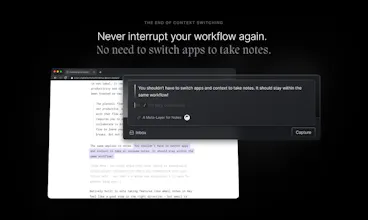
Context switching is poison for productivity. When you get that brilliant idea or see something inspiring, you should be able to take smart notes without switching app or tabs. That’s Lazy. One ⌘ shortcut to capture anywhere. Sign up to our waitlist at lazy.so!
This is the 4th launch from Lazy. View more
Lazy for Notion

Lazy for Notion

One ⌘ shortcut to capture anything straight to Notion
Meet the Lazy way to capture — designed for speed and to keep you in the zone: - One shortcut to take notes instantly + leveraging AI from anywhere - All the power of a beautiful markdown editor in a command-line interface - Understands the context you’re in
Lazy for Notion gallery image
Free Options
Launch tags:ProductivityWritingNotes
Launch Team
agent by Firecrawl
agent by Firecrawl
Gather structured data wherever it lives on the web
Promoted

What do you think? …

Ahmed Men
Maker
📌

Hey Product Hunt 😻

Some of you might remember when we first launched Lazy here — a universal capture tool, one ⌘ shortcut away.
Then with Lazy 2.0, we introduced AI that allows you to chat to all of your notes at once.

Today, we’re excited to share something you massively requested: Lazy now captures directly into Notion.

Why? Because while Lazy is where you capture in the moment, many of you already organize your long-term team projects in Notion. Until now, you had to choose: do I save this into Lazy, or do I copy/paste it into Notion later?

Now you don’t have to.

With the same shortcut, you can capture:

- Quick notes and highlights

- Tweets and entire threads

- YouTube videos with transcripts

- Articles, PDFs, and emails

→ And send them directly to your Notion pages — complete with context like source links, authors, and backlinks.

And it’s not just about notes. Lazy also handles task captures beautifully — saving the task, link, and people automatically so you can stay in flow.

Excited to hear how you’ll use it!

Nash

@demtzu love the launch video, super slick, but it looks good because the Lazy UI/UX is S-tier

Ahmed Men

@nash Appreciate it, Nash! Coming from you, that’s S-tier motivation ⌘❤️

Thomas des Francs

Congrats on the new bridge!

Calum Webb

@thomas_df Thanks Thomas 🙌

Ahmed Men

@thomas_df Coucou vous ! Merci ❤️

Francesco D'Alessio

Congrats on the release Lazy team

Calum Webb

@francescod_ales Cheers Francesco! Thanks for all your support of Lazy 🫶

Ahmed Men

@francescod_ales Thanks, Francesco! The Tool Finder seal of approval made our day 💌

Ionut Sabo

What platforms is it available on? Mac only?

Calum Webb

@ionutsabo Lazy's available on MacOS, iOS and we have a web app as well. The power of Lazy's capturing works best on Mac and iOS though!

Ionut Sabo

@calum any plans for bringing it to Windows?

Ansub Khan

Congratulations on the launch! This is one of the most well-thought-out productivity apps!

Ahmed Men

@ansub Thanks a ton, Ansub! ❤️ We’ve poured a lot of love (and coffee ☕️) into trying to make it feel that way!

Vladimir Lugovsky

Simple, fast, and exactly what power users love. Congrats on shipping!

Calum Webb

@vladimir_lugovsky Thanks Vladimir, we couldn't agree more! Thanks for the kind words 🫶

Ahmed Men

@vladimir_lugovsky Thanks a lot, Vlad 🙌 Means a lot — that’s exactly what we were aiming for!

César M.

Congrats on the launch!

Calum Webb

@heycesr Thanks César, really appreciate it!

Ahmed Men

@heycesr ⌘💐

12
Next
Last