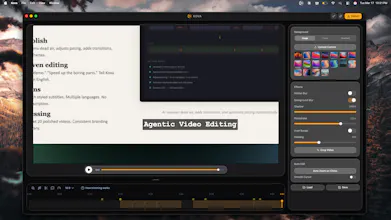
Kova is a macOS screen recorder with an agentic AI editing pipeline. Record with auto-zoom that follows your cursor, smooth camera work, webcam PiP, and system audio — then hit one button. Kova's AI extracts frames, detects scenes, removes dead air, adjusts pacing, adds transitions, and inserts zoom keyframes. A review agent verifies every edit. Edit with natural language: "Make this a product demo" or "Speed up the boring parts." 4K/60fps output.
I built Kova because I was frustrated with the screen recording workflow. Every week I'd spend 5 minutes recording a product demo then 30+ minutes editing it. Trimming dead air, adding zoom keyframes, adjusting pacing... it felt like busywork that should be automated.
PS: I have extended a launch pricing which is lifetime value and additional 15% discount for PH users.
Existing tools made me choose: beautiful recordings (Screen Studio) OR AI editing (Descript). Nobody offered both.
So I built Kova a macOS screen recorder where AI handles post-production. Here's what makes it different:
🎥 Recording: Auto-zoom follows your cursor with cinematic motion using Catmull-Rom spline interpolation. Webcam PiP, system audio, cursor smoothing - all built in.
🤖 AI Editing: Hit "AI Polish" and an agentic pipeline takes over it extracts frames, analyzes scenes, removes dead air, adjusts pacing, adds transitions, and inserts zoom keyframes. A separate review agent verifies every edit using seek-and-screenshot before delivering.
✍️ Prompt Editing: Tell Kova what you want in plain English. "Make this a product demo." "Speed up the boring parts." It translates intent into precise edits.
The tech stack: Electron + PixiJS 8 for 60fps rendering, WebCodecs for hardware-accelerated 4K encoding, and a multi-agent AI system with tool-use capabilities.
Would love your feedback - what features would make this a must-have for your workflow?


Oppla AI
Hey PH! 👋 I'm the maker of Kova.
I built Kova because I was frustrated with the screen recording workflow. Every week I'd spend 5 minutes recording a product demo then 30+ minutes editing it. Trimming dead air, adding zoom keyframes, adjusting pacing... it felt like busywork that should be automated.
PS: I have extended a launch pricing which is lifetime value and additional 15% discount for PH users.
Existing tools made me choose: beautiful recordings (Screen Studio) OR AI editing (Descript). Nobody offered both.
So I built Kova a macOS screen recorder where AI handles post-production. Here's what makes it different:
🎥 Recording: Auto-zoom follows your cursor with cinematic motion using Catmull-Rom spline interpolation. Webcam PiP, system audio, cursor smoothing - all built in.
🤖 AI Editing: Hit "AI Polish" and an agentic pipeline takes over it extracts frames, analyzes scenes, removes dead air, adjusts pacing, adds transitions, and inserts zoom keyframes. A separate review agent verifies every edit using seek-and-screenshot before delivering.
✍️ Prompt Editing: Tell Kova what you want in plain English. "Make this a product demo." "Speed up the boring parts." It translates intent into precise edits.
The tech stack: Electron + PixiJS 8 for 60fps rendering, WebCodecs for hardware-accelerated 4K encoding, and a multi-agent AI system with tool-use capabilities.
Would love your feedback - what features would make this a must-have for your workflow?