
Kogvio
Understand anything online without leaving the page.
155 followers
Understand anything online without leaving the page.
155 followers
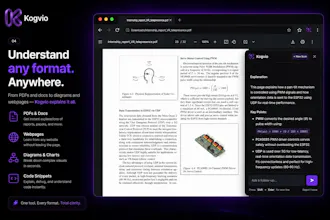
Every time I didn't understand something online, I had the same workflow: Copy. Open ChatGPT. Paste. Come back. It completely broke my focus. So I built Kogvio. Highlight anything on a webpage or PDF, ask questions instantly in context, and continue learning without leaving the page. Whether it's documentation, research papers, medical textbooks, or technical diagrams, Kogvio helps you understand—not just search.




Free Options
Launch Team / Built With

Congrats, Harshit! Fellow extension builder here — quick one on “your data stays yours”: since scans save to a workspace and diagrams go through a vision model, is highlighted content sent per-request only (not used for training), and can I delete a scan? That’s what decides whether I’d keep an in-page AI tool always-on.
Kogvio
@andrei_rebrov1 Thanks Andrei! Always great to connect with a fellow builder. Completely understand the concern, so here is the transparent breakdown:
Yes, highlighted content is processed strictly per-request via our backend API. Zero user data or scans are used to train the underlying vision models.
Absolutely. You have full control over your workspace. You can permanently delete any scan or chat history directly from your dashboard at any time.
Built this to be a secure, always-on tool for my own workflows, so privacy is a top priority. Let me know if you have any other technical questions!
@harshit_kataria1 Perfect — per-request only, no training on user data, and delete-anytime from the dashboard. That’s exactly the trifecta that makes an in-page AI tool keep-able. Thanks for laying it out so transparently, Harshit — wishing Kogvio a great run! 🎉
Kogvio
@andrei_rebrov1 Thanks so much, Andrei! Really appreciate the kind words and the support. Cheers! 🚀
Hi Harshit, congrats!
I'm curious about how you see the future of products like Kogvio when AI keeps being more and more integrated into the browser and the OS (i.e. Chrome now has a "Ask Gemini" option in the context menu when you select text). Thanks!
Kogvio
@luis_parker Hey Luis, great question! It is definitely something I think about a lot.
The way I see it, native browser and OS integrations are currently optimizing for general text workflows-like highlighting a paragraph to summarize or rewrite it. Kogvio's edge is hyper-specific visual context. Native text-selection tools completely miss caption-less architecture diagrams, overlapping flowcharts, complex math, and messy handwritten notes.
As for the future, our north star is ultimate user convenience. While the browser extension is step one, we are actively mapping out ways to expand this workflow so it meets users exactly where they are working. I can't spill all the secrets just yet, but we are building toward making this visual extraction even more seamless and universally accessible, no matter what you are looking at on your screen.
The big players will own general text, but there is a massive need for specialized visual learning tools!
honestly the highlight-and-ask flow sounds really clean. one thing i'd want though, basically a keyboard shortcut to open the side panel so i'm not hunting for a small button every time. something like cmd+shift+k would make it feel instant and keep my hands on the keyboard.
Kogvio
@hediyedilli Great news, Hediye—you can actually do this right now! Kogvio has a built-in global shortcut: just hit `Cmd+Shift+E` (or `Ctrl+Shift+E` on Windows) and the crosshair will instantly pop up so you never have to touch your mouse.`
(Note: If it doesn't trigger immediately, you might just need to quickly verify it isn't conflicting with another extension by checking chrome://extensions/shortcuts). Let me know how that feels for your workflow!
Would love to see a quick keyboard shortcut to toggle Kogvio on and off without losing my highlight. Right now I have to reach for the mouse every time, which kinda defeats the staying-in-flow part.
Kogvio
@vedatzoraphyai Way ahead of you, Vedat! Keeping you in the flow state is exactly why Kogvio already has a global shortcut built-in. Just hit `Cmd+Shift+E` (or `Ctrl+Shift+E` on Windows) and it will instantly toggle the scanner without you ever needing to reach for the mouse.
Give that a try! (If it doesn't trigger, just double-check chrome://extensions/shortcuts to make sure another app isn't overriding it). Cheers!
been wanting something like this for a while honestly, the copy paste dance into chatgpt is so annoying. one thing though, it would be really nice if you could save snippets or highlighted passages into a little notebook inside the extension so i could come back to them later without losing track. like a quick personal knowledge base built up as i browse.
Kogvio
@niyaziucar71015 The copy-paste dance is exactly what I wanted to kill! And I have great news for you, Niyazi—that notebook feature is actually already built in.
Everything you scan with Kogvio is automatically saved to your personal web dashboard (Vault) so you build up that exact knowledge base as you browse. Even better, you can open up any of those past snippets later and continue asking follow-up questions right where you left off.
Check out your dashboard and let me know if it fits the workflow you had in mind!
honestly this solves something that's bugged me for ages. one thing that would make it even better is keyboard shortcuts to highlight and summon the popup without needing the mouse, basically so you stay in flow while reading long PDFs or docs. right now i imagine reaching for the trackpad breaks that focus you're trying to preserve.
Kogvio
@aryaaltuntokiv You read my mind, Arya! Preserving that flow state is exactly why this feature is already built right in.
You don't need to reach for the trackpad to summon the popup—just hit `Cmd+Shift+E` (or `Ctrl+Shift+E` on Windows) and the crosshair will instantly appear. Give it a try on your next long PDF and let me know if it keeps you in the zone!
(Quick tip: If the shortcut doesn't trigger immediately, just check chrome://extensions/shortcuts to make sure another extension isn't overriding it).
The detail that makes this credible to me is that diagrams go through a pure vision model reading the actual pixels — not DOM-scraping the nearby text. Most in-page tools quietly fall back to caption-grabbing and fall apart the second a figure has no caption.
Coming from browser automation, that DOM-vs-vision call is exactly the thing people get wrong. And keeping the capture to just the highlighted bounding box to stay fast and cheap is the right instinct.
Nicely done @harshit_kataria1 👌
Kogvio
@akbar_b Thank you so much, this really means a lot! Hearing that from someone with a background in browser automation is high praise. You're right—getting that balance between pure vision accuracy and keeping the bounding-box capture lightweight was the biggest technical challenge to get right. I'm really glad the effort to avoid 'caption-guessing' is clear! Appreciate the support